How To Spot a Phishing Email: Red Flags and Best Practices
Apr 15

Phishing continues to be one of the most persistent cybersecurity threats because it targets people rather than technical systems. Attackers use social engineering tactics like impersonation, urgency, and fake credential-harvesting websites to get employees to click links, open attachments, or share sensitive information. Breach investigations consistently show that phishing and related tactics remain among the most common ways attackers gain initial access to organisational systems.
The scale of phishing is also significant. Security research shows that billions of phishing emails are sent every day, meaning employees are regularly exposed to these attacks even in organisations with strong email filtering in place.
Phishing methods are also evolving. The use of AI, phishing kits, and automated tools allows attackers to create more convincing messages and launch campaigns at scale, making detection more difficult than before.
Because these attacks depend on human interaction, recognising common warning signs remains one of the most effective ways to reduce risk. This guide outlines key phishing red flags employees should know and how organisations can strengthen human-focused security practices to detect and prevent attacks earlier.
The Current Phishing Threat Landscape and Business Impact (2025–2026)
Many cyberattacks begin with user interaction, making phishing a consistent and effective method for initial access. These attacks depend on everyday actions like clicking links or entering credentials, making them difficult to prevent using technical controls alone. As a result, phishing remains a consistent and effective entry point across organisations.
1. Phishing today is fast, human-driven, and built to scale
Phishing continues to be one of the most common entry points into organisations, and it rarely stops at just one click. Reports show that around 16–17% of breaches start with phishing, often followed by credential theft and deeper system access.
At the same time, human behaviour plays a major role. Studies consistently find that 60%-74% of breaches involve the human element, whether it’s clicking a link, reusing credentials, or making a simple mistake. What makes this even more difficult to manage is the scale at which phishing operates today.
With the rise of Phishing-as-a-Service (PhaaS), attackers can access ready-made tools, templates, and infrastructure to launch campaigns with very little technical skill. Phishing kits make it easy to replicate legitimate websites and deploy attacks quickly and at scale. Studies have identified over one million phishing pages in a single year, driven by these kits. In fact, users can fall for phishing emails in under a minute, showing just how quickly these attacks can succeed once they land.
2. Artificial intelligence is accelerating phishing attacks
Threat intelligence reports indicate that attackers are increasingly using generative AI to produce phishing content. Data shows a 1,265% increase in phishing emails linked to AI-driven techniques, highlighting the growing use of automation. These tools are used to generate realistic messages and impersonation attempts at scale.
Reporting on Anthropic’s unreleased Claude Mythos model, covered by Fortune (2026), highlights a significant shift in AI capability and its potential impact on cybersecurity. Internal documents reviewed in the report describe the model as a “step change” and warn that it poses serious cybersecurity risks, particularly due to its advanced capabilities in identifying and exploiting vulnerabilities. The report also notes that the model is considered to be far ahead of existing systems in cyber-related capabilities, with concerns that such tools could enable attackers to exploit vulnerabilities at a pace that outmatches current defensive efforts.
There’s also growing evidence that AI isn’t just helping write phishing emails, but it’s also being used much earlier in the attack process. Instead of waiting for an entry point, these systems can now scan software, platforms, and codebases to identify weaknesses on their own. In some cases, advanced models have been shown to uncover thousands of vulnerabilities across operating systems and browsers without human input.
This changes how attacks are carried out. Instead of manually searching for weak spots, attackers can rely on AI to quickly find potential entry points and then use phishing or other methods to exploit them. Research also shows that AI can support multiple stages of an attack, from identifying targets to carrying out multi-step intrusions, making the entire process faster and more scalable.
3. Phishing doesn’t just get in - it leads to costly, high-impact attacks
Phishing attacks don’t just act as an entry point; they often lead to some of the most financially damaging cyber incidents organisations face. Reports show that the average cost of a data breach is around $4.44 million globally, covering everything from incident response and downtime to legal fees and reputational damage.
Once attackers gain access through phishing, they often escalate their attacks, with ransomware being a common next step. Security data shows that ransomware incidents are widespread and continue to grow, significantly increasing both operational disruption and recovery costs.
At the same time, phishing is closely linked to Business Email Compromise (BEC) attacks, in which attackers impersonate executives or vendors to trick organisations into transferring money. These scams have caused billions in losses globally, with long-term damages continuing to rise each year. All these show that phishing is not just a minor security issue; it is often the starting point for larger, more expensive attacks that can seriously impact an organisation’s finances and operations.
Phishing Red Flags Employees Should Know
Phishing attacks often follow clear and recognisable patterns. Even with the use of AI, automation, and more advanced social engineering techniques, many phishing messages still contain visible warning signs that can be identified with careful attention. Pausing before taking any action is the first step in identifying these threats, as attackers often rely on urgency and quick reactions to succeed. Once users slow down, recognising common red flags helps them verify suspicious messages and report potential threats before any sensitive information is exposed. Security reports also estimate that over 90% of cyberattacks begin with phishing or social engineering, making the ability to identify these warning signs a critical part of enterprise cybersecurity.
1. Suspicious or unfamiliar sender addresses
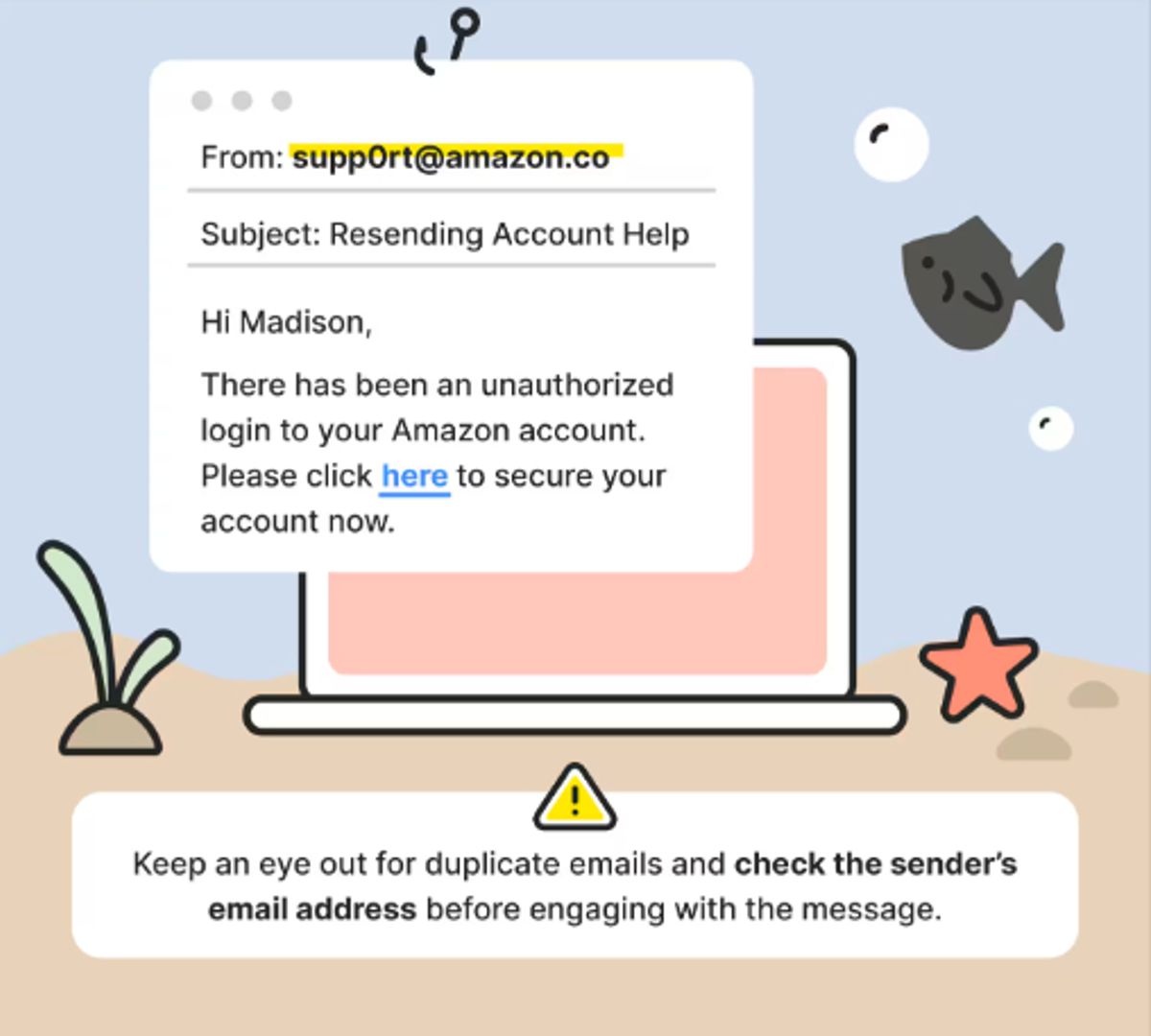
Phishing emails often appear to come from trusted organisations but contain small inconsistencies in the sender’s address. Attackers use look-alike domains to make emails appear legitimate and gain user trust.
Unfamiliar sender: Emails from unknown or unexpected senders should be treated with caution.
Look-alike domains: Domains may mimic real brands by changing letters, numbers, or adding characters.
Display name mismatch: The sender's name may look legitimate, but the domain may not match the organisation.
Best practices for employees
- Check the sender’s full email address carefully before responding.
- Compare with previous legitimate emails from the same organisation.
- Verify suspicious emails through official contact channels.
- Report suspicious emails to the security team.
Source: Norton
2. Urgent or threatening requests
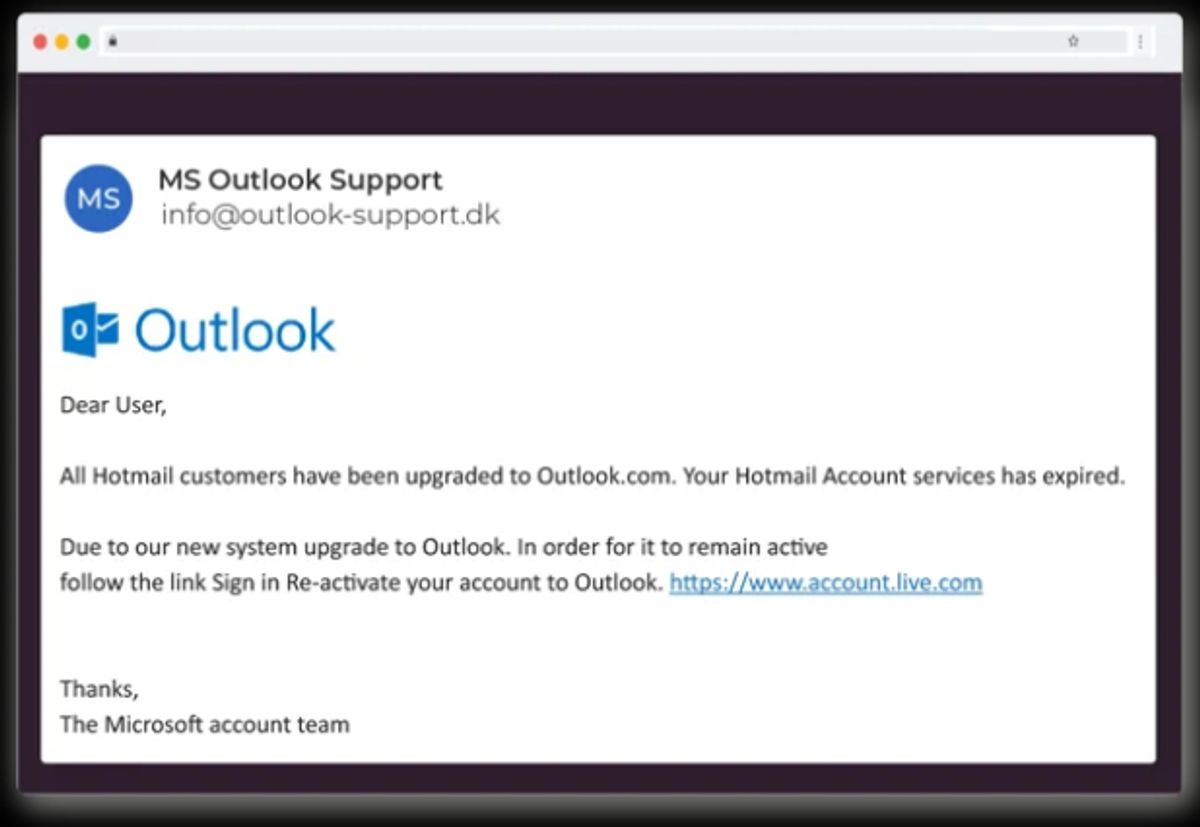
Phishing emails often create a sense of urgency to push users into acting quickly without verification. These messages may use fear or authority to pressure immediate action.
Urgent language: Messages that demand immediate action are designed to bypass verification.
Fear-based messaging: Emails may threaten account suspension or penalties.
Authority impersonation: Attackers may pretend to be executives or IT staff.
Best practices for employees
- Pause and review urgent requests before taking action.
- Verify requests using official communication channels.
- Do not approve urgent financial or credential requests without confirmation.
- Report suspicious requests to IT or security teams.
Source: CyberPilot
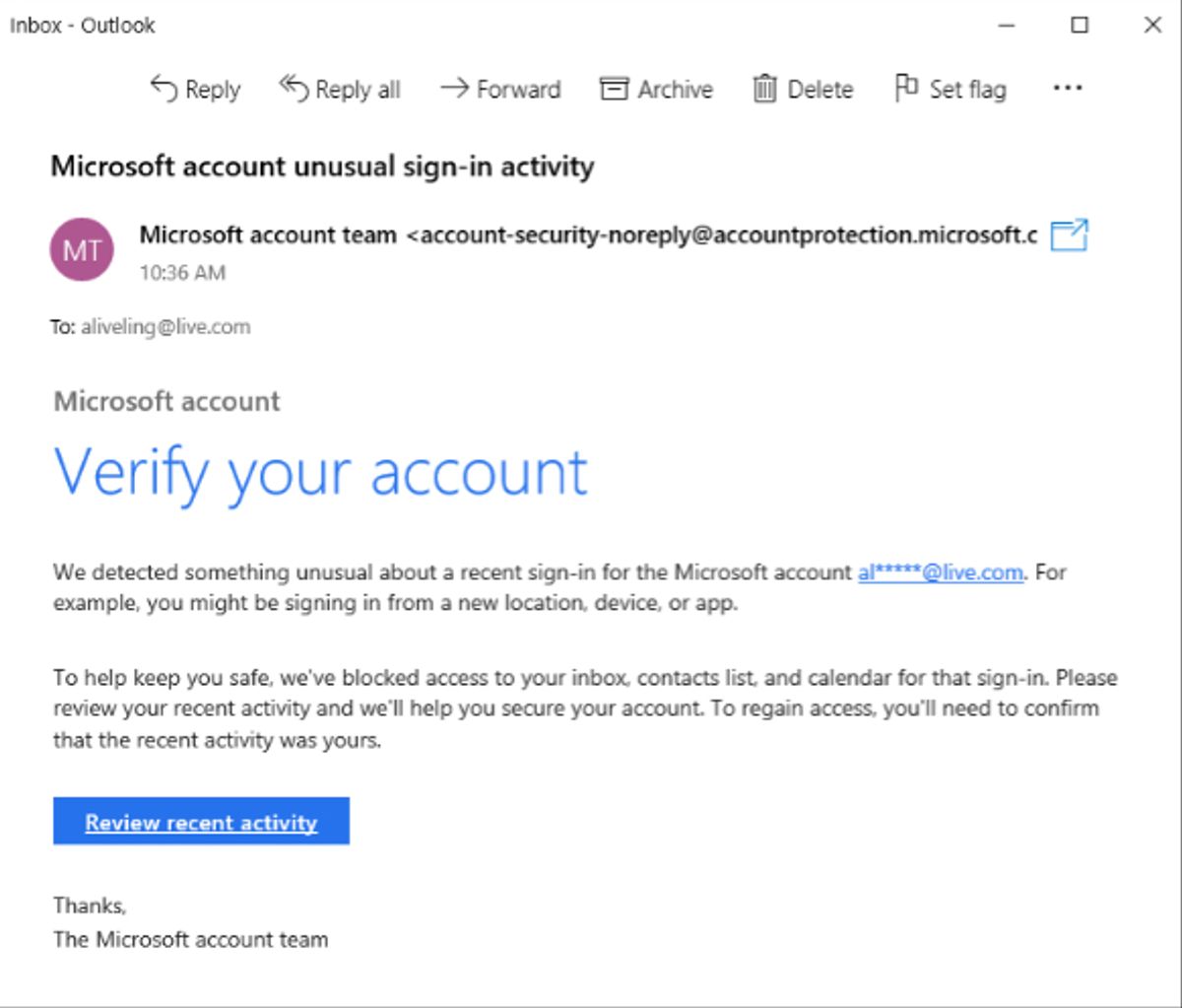
3. Suspicious links in emails
Phishing emails often include links that redirect users to fake websites designed to steal credentials. These websites usually imitate legitimate platforms such as email or banking services.
Mismatched URLs: The displayed link may differ from the actual destination.
Hidden redirects: Shortened or redirected links may hide the real URL.
Credential-harvesting pages: Fake login pages collect usernames and passwords.
Best practices for employees
- Hover over links to check the actual URL before clicking.
- Ensure the domain matches the legitimate organisation.
- Access websites directly instead of using email links.
- Report suspicious links immediately.
Source: CyberPilot
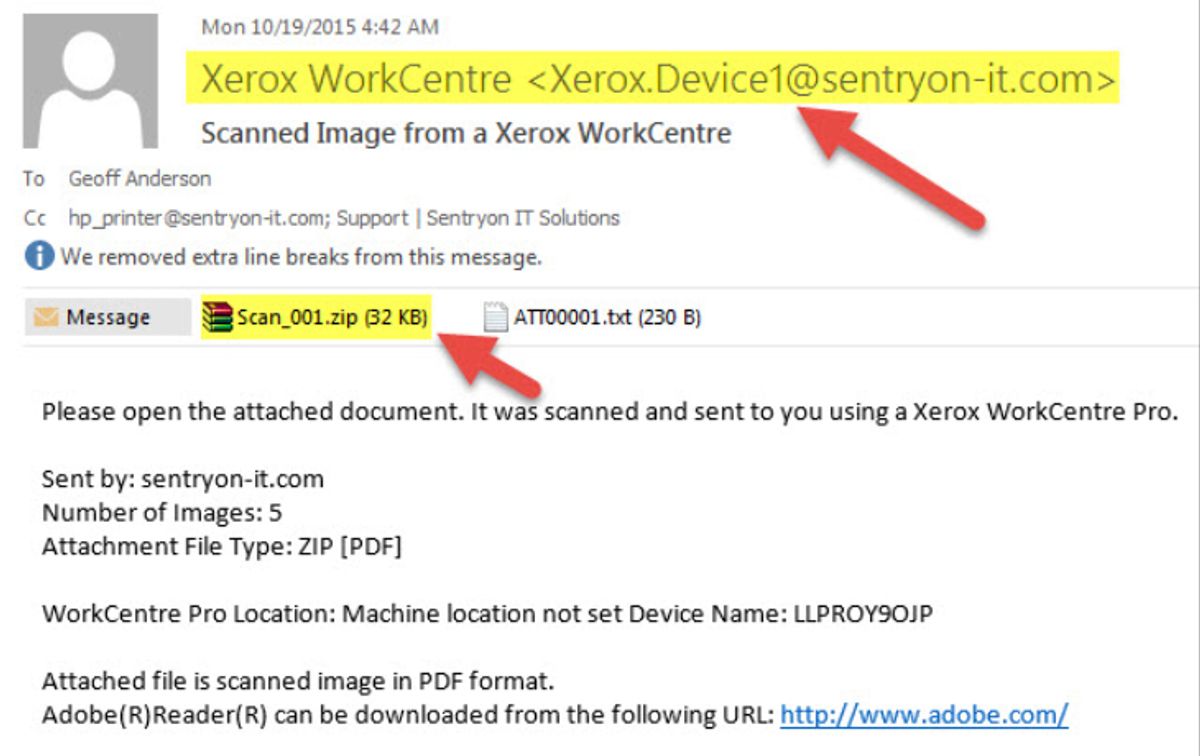
4. Unexpected attachments
Phishing emails often include attachments that may install malware or redirect users to malicious sites. These files are often disguised as invoices, reports, or delivery documents.
Unusual file types: Files like .exe, .zip, or .scr may contain malware.
Unexpected documents: Attachments that were not requested may be unsafe.
Malicious downloads: Some files may trigger harmful downloads when opened.
Best practices for employees
- Avoid opening attachments from unknown or unexpected senders.
- Verify the file with the sender before opening it.
- Scan attachments using antivirus tools.
- Report suspicious attachments immediately.
Source: Sentryon
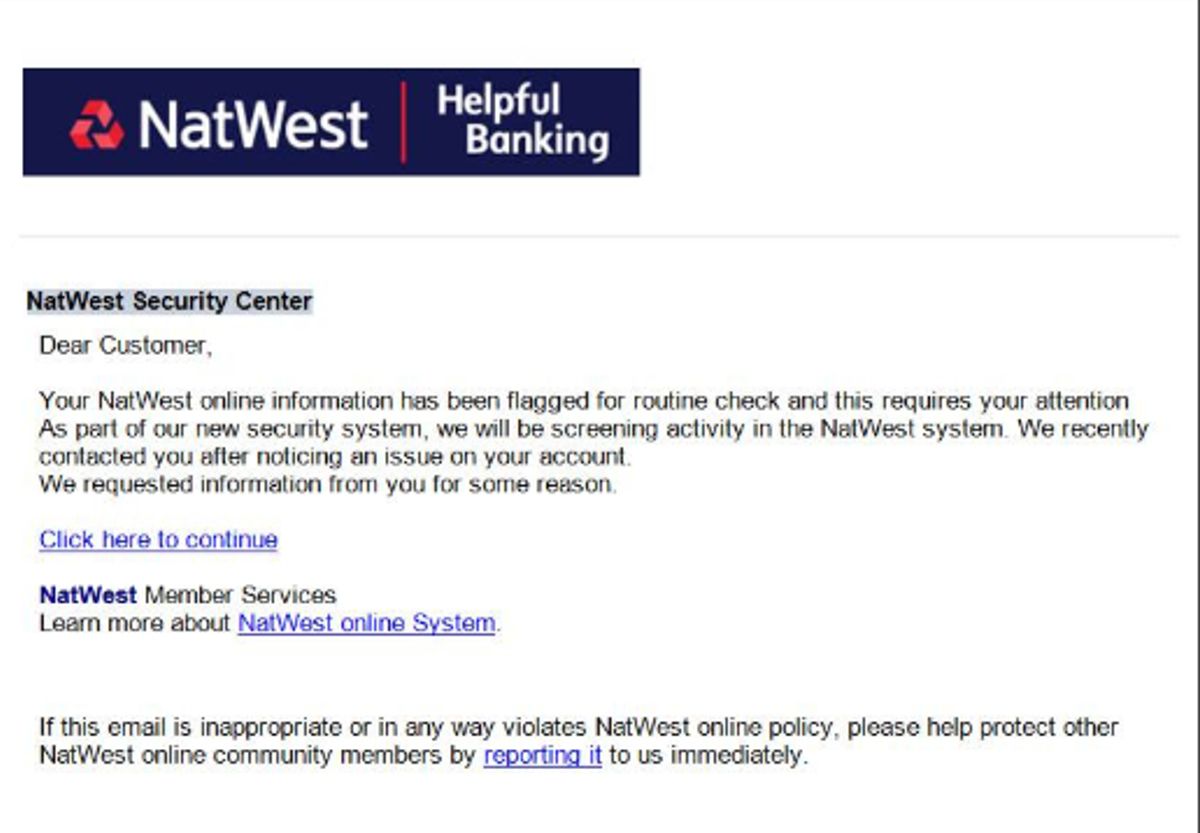
5. Requests for sensitive information
Phishing emails often attempt to collect confidential data such as login credentials or financial details. Legitimate organisations typically do not request such information through unsolicited emails.
Credential requests: Emails may ask for usernames, passwords, or authentication codes.
Payment information: Requests for banking or card details may indicate fraud.
Account verification scams: Messages may ask users to “verify” accounts through links.
Best practices for employees
- Never share passwords or authentication codes via email.
- Use official portals to verify account-related requests.
- Contact the organisation directly if unsure.
- Report credential-harvesting attempts.
Source: CyberPilot
6. Generic greetings or unusual language
Phishing emails often use generic greetings because attackers do not know the recipient personally. They may also contain unusual wording or inconsistent language.
Generic greetings: Messages may use terms like “Dear User” instead of a name.
Grammar issues: Poor spelling or awkward phrasing may be present.
Unusual tone: The email may not match the normal communication style.
Best practices for employees
- Be cautious of emails that do not address you by name.
- Check for spelling, grammar, and tone inconsistencies.
- Compare with previous legitimate emails.
- Report suspicious messages.
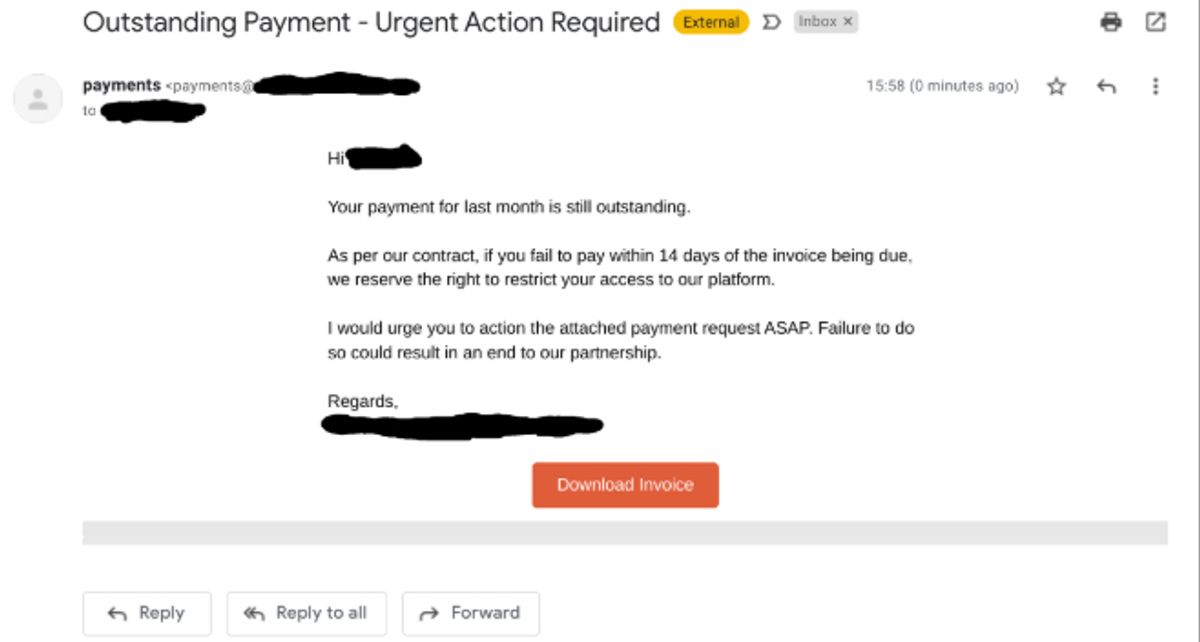
7. Unexpected payment or invoice requests
Phishing emails may impersonate vendors or finance teams to request payments. These attacks are commonly linked to Business Email Compromise (BEC).
Invoicescams: Emails may include fake invoices requesting payment.
Payment changes: Messages may request updates to banking details.
Urgent transfers: Requests may involve immediate wire transfers or gift cards.
These scams cause billions of dollars in losses globally each year.
Best practices for employees
- Verify payment requests through official channels.
- Follow internal financial approval processes.
- Avoid making urgent payments without confirmation.
- Report suspicious financial requests.
Source: usecure
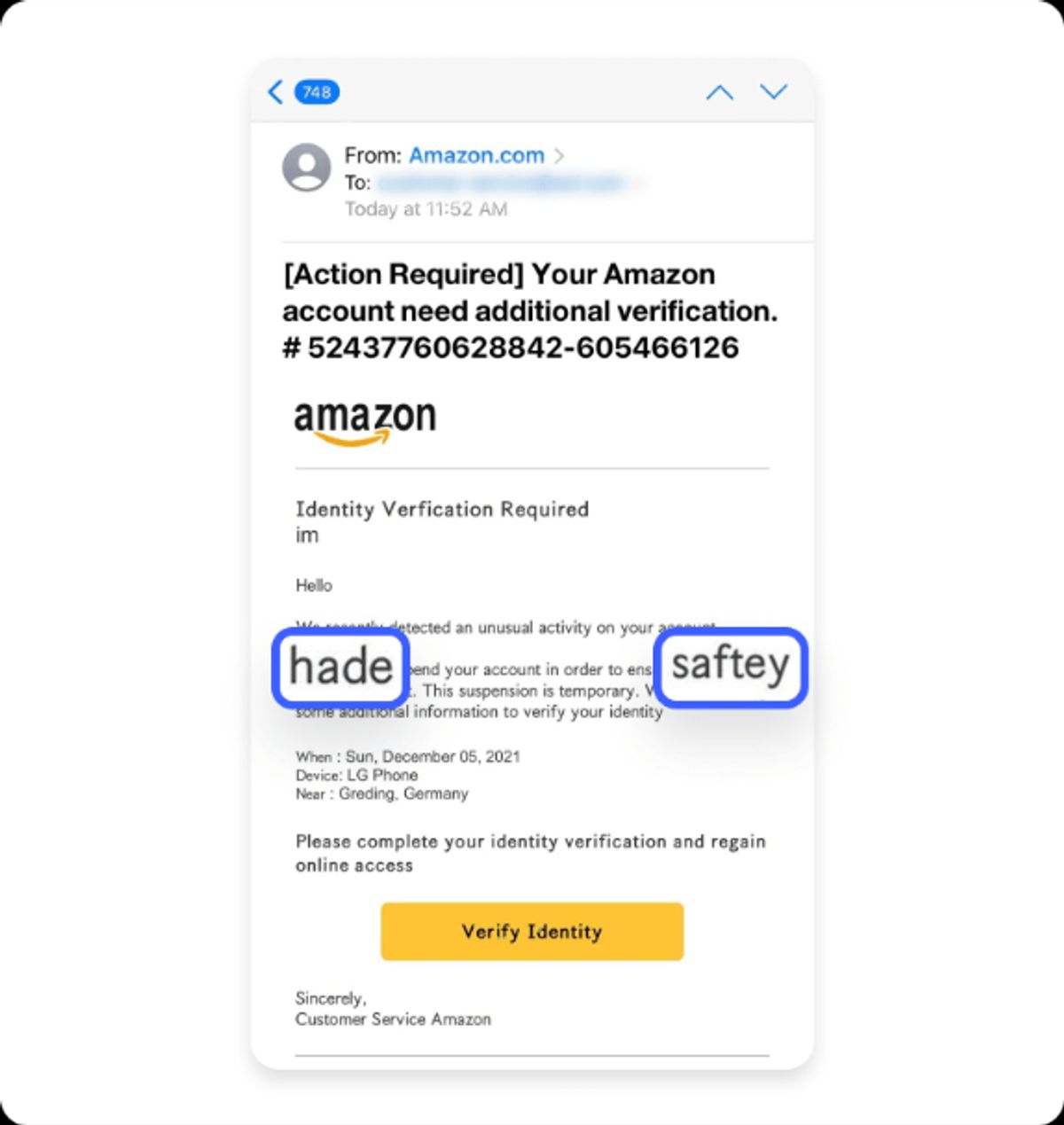
8. Fake security alerts or account notifications
Phishing emails often imitate alerts from trusted platforms to create panic. They may claim suspicious activity or require immediate account action.
Account warnings: Emails may claim unusual login activity.
Security alerts: Messages may ask users to secure their accounts.
Credential reset links: Links may lead to fake login pages. (Abnormal AI)
Best practices for employees
- Log in directly through official websites instead of email links.
- Verify alerts using official apps or systems.
- Report suspicious notifications.
- Enable multi-factor authentication.
Source: NordVPN
9. Unusual email design or branding
Phishing emails often try to copy official branding but may contain visible inconsistencies. Small design differences can indicate a fraudulent message.
Low-quality logos: Images may appear distorted or unclear.
Incorrect formatting: Fonts or colours may not match official branding.
Inconsistent contact details: Contact information may differ from official sources.
Best practices for employees
- Compare emails with previous legitimate communications.
- Check official websites for correct contact details.
- Avoid responding to poorly formatted emails.
- Report suspicious emails.
10. Unexpected phone calls (Vishing)
Phishing attacks can also occur through phone calls, where attackers impersonate trusted entities. These calls are used to obtain sensitive information directly from individuals.
Unsolicited calls: Calls from unknown numbers claiming to be trusted organisations may be fraudulent.
Sensitive information requests: Callers may ask for passwords or banking details.
Urgent tone: Callers may pressure for quick action.
Best practices for employees
- End the call and verify using official contact numbers.
- Never share passwords or codes over phone calls.
- Ask for the caller's details and verify identity.
- Report suspicious calls.
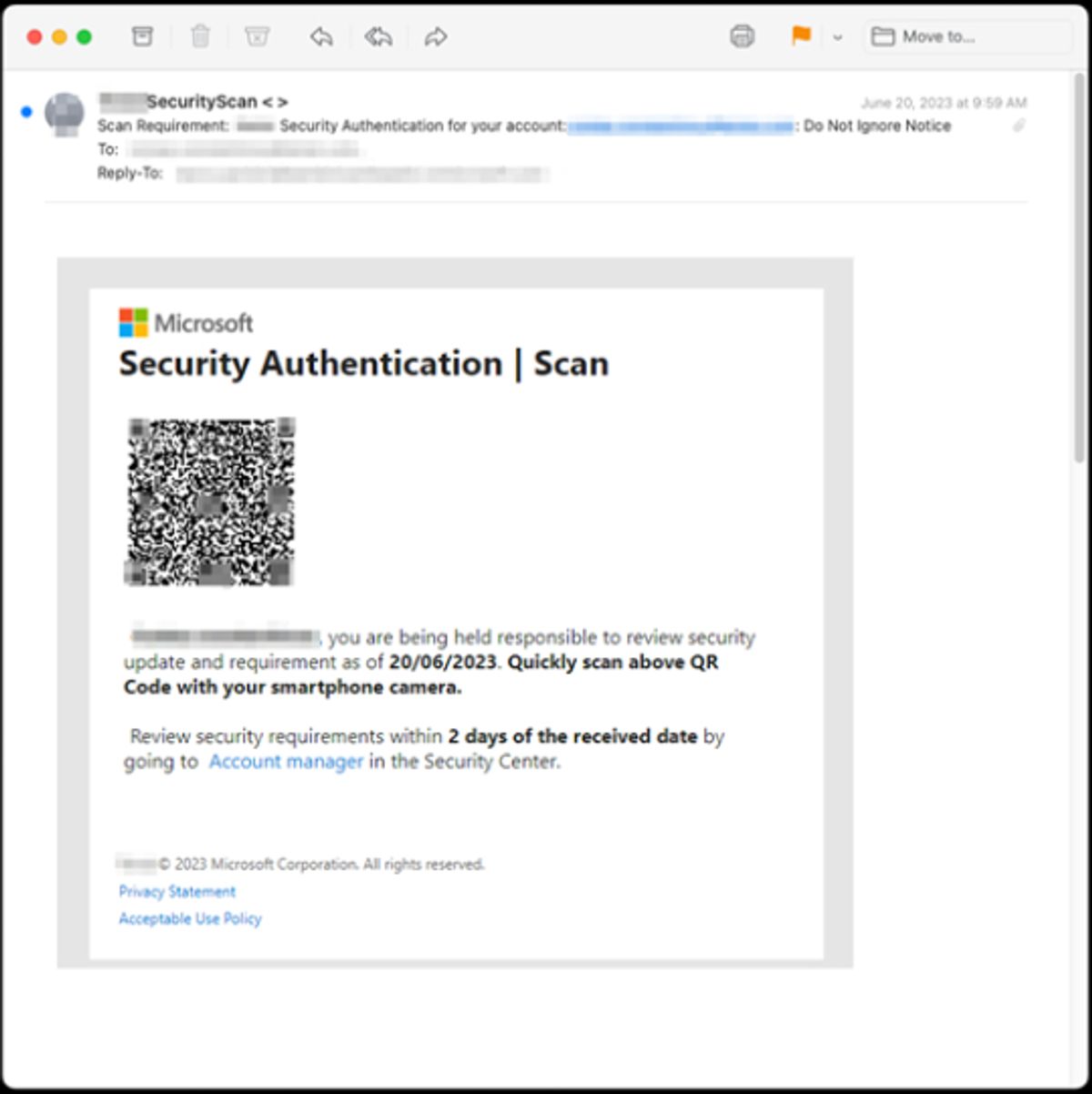
11. QR-code phishing (Quishing)
Attackers may include QR codes in emails that redirect users to phishing websites. These attacks often target mobile users, where links are harder to verify.
Malicious QR codes: QR codes may lead to fake login or payment pages.
Mobile-based attacks: QR links may hide malicious URLs on mobile devices.
Best practices for employees
- Avoid scanning QR codes from unknown sources.
- Check the destination before entering any details.
- Use official websites instead of QR links.
- Report suspicious QR-code emails.
Source: Inky
12. Multi-channel phishing attacks
Phishing campaigns may use multiple channels to appear more credible. Attackers may combine email, phone calls, SMS, or social media messages.
Cross-channel attacks: Messages may appear across email, SMS, or collaboration tools.
Social media impersonation: Attackers may contact users through online platforms.
Coordinated scams: Multiple channels may be used together to build trust.
Best practices for employees
- Treat unexpected messages across all platforms with caution.
- Verify requests using trusted internal systems.
- Avoid sharing sensitive information across channels.
- Report suspicious communications.
Why Phishing Goes Unnoticed and How OutThink Solves It
Phishing attacks persist not because organisations lack tools, but because they exploit how people think and act. Research shows that even with existing security measures and training programs, users continue to fall for phishing due to decision-making patterns, cognitive biases, and real-world pressure scenarios. This creates a gap between awareness and actual behaviour, where knowing what phishing looks like does not always translate into responding safely.
Addressing this gap requires approaches that are grounded in real user behaviour and real threats, rather than generic training alone. This is where solutions like OutThink come in, by connecting real attacks with how users are trained to recognise and respond to them.
To understand this better, let’s look at the key reasons why phishing often goes unnoticed and how this gap can be addressed in practice:
| Issue | Problem | OutThink Solution | Why this works |
|---|---|---|---|
| 1. Users struggle to detect modern phishing emails | Research shows users often struggle to detect phishing emails, especially when they closely resemble legitimate communication. As phishing becomes more sophisticated, detection becomes harder, and users find it difficult to identify malicious emails accurately. | OutThink uses phishing emails identified through RTT to inform simulations and awareness activities. This ensures that training reflects current attack patterns and the types of phishing emails users are actually exposed to. | Training is more effective when it is realistic and continuously updated. Using real threats improves users’ ability to recognise similar patterns in real emails. |
| 2. Training is treated as a one-time activity rather than ongoing learning | Phishing is a continuous threat, but training is often delivered only occasionally. Research shows that annualised training programs are unlikely to provide sustained protection, and users can be just as likely to fall for phishing even after completing training. | OutThink uses real-time threats identified through RTT detection system to trigger timely simulations and awareness nudges. This allows organisations to respond to active phishing attacks and align training with what users are currently experiencing. | Research shows that repeated exposure, active engagement, and reinforcement improve phishing detection over time. Training that is delivered continuously and in context helps users better recognise and respond to threats in real situation. |
| 3. Human behaviour and cognitive patterns are exploited | Phishing attacks exploit human behaviour and not just technical weaknesses. Research shows that factors like attention, habits, and behavioural patterns influence how users respond to phishing emails. These behavioural aspects play a major role in whether users fall for attacks. | OutThink’s phishing simulation supports root cause analysis and automated follow-up training for users who fall for phishing simulations. This helps identify why users were tricked and delivers targeted training based on the specific indicators they missed. | Research shows behaviour improves through feedback and reinforcement, not just awareness. By identifying mistakes and reinforcing learning, users are better prepared to respond to similar threats. |
| 4. Security teams struggle to prioritise threats | Security teams receive many reported emails, but often cannot identify which ones are real threats. This makes it difficult to decide what should be prioritised for training or action, leading to gaps in awareness program. | OutThink’s RTT system processes reported emails and classifies them based on attack type and techniques. It assigns a Phishing Likelihood (PL) index score to prioritise high-risk threats and surfaces the most relevant ones to admins, helping guide simulations and awareness decisions. | Large volumes of alerts reduce effectiveness if not prioritised. By focusing on high-risk threats, teams can make better decisions and improve the impact of training. |
Sources
- https://researchgate.net/publication/388824882_Why_People_Still_Fall_for_Phishing_Emails_An_Empirical_Investigation_into_How_Users_Make_Email_Response_Decisions
- https://www.researchgate.net/publication/392495542_Assessing_the_Efficacy_of_Security_Awareness_Training_in_Mitigating_Phishing_Attacks_A_Review
- https://www.sciencedirect.com/science/article/pii/S0167404823006053
- https://sosafe-awareness.com/blog/real-world-data-effectiveness-phishing-simulations/
- https://www.verizon.com/business/resources/reports/dbir/
- https://www.brside.com/blog/security-awareness-training-statistics-2025-100-studies
- https://www.ibm.com/thought-leadership/institute-business-value/en-us/report/2025-threat-intelligence-index
- https://spycloud.com/blog/5-takeaways-from-ibms-cost-of-a-data-breach-report-2024
- https://www.mimecast.com/blog/verizon-60-of-breaches-involve-human-error/
- https://arxiv.org/abs/2509.13186
- https://www.itpro.com/security/data-breaches/ai-breaches-arent-just-a-scare-story-any-more-theyre-happening-in-real-life
- https://www.ibm.com/reports/data-breach
- https://www.fortinet.com/uk/resources/cyberglossary/cybersecurity-statistics
- https://arxiv.org/abs/2511.20944
- https://www.huntress.com/phishing-guide/phishing-attack-statistics
- https://autospf.com/blog/microsoft-security-alert-email-how-to-recognize-phishing-and-scams/
- https://support.microsoft.com/en-us/windows/protect-yourself-from-phishing-0c7ea947-ba98-3bd9-7184-430e1f860a44
- https://abnormal.ai/blog/microsoft-email-scams
- https://support.franklin.edu/hc/en-us/articles/360009283813-Phishing-or-Fraudulent-Emails-Identification-and-Response
- https://www.phishingbox.com/resources/phishing-facts
- https://www.theverge.com/ai-artificial-intelligence/908114/anthropic-project-glasswing-cybersecurity
- https://fortune.com/2026/03/26/anthropic-says-testing-mythos-powerful-new-ai-model-after-data-leak-reveals-its-existence-step-change-in-capabilities/
Experience OutThink
Related Articles

Human Risk Management is now Secure Behavior Management. We think Gartner is right.
Read More
OutThink Recognized in Gartner's Secure Behavior Management Research
Read More