Cybersecurity Simulation Training: Attack Types, Best Practices, and Metrics That Prove It's Working
Apr 26

Phishing and social engineering remain some of the most common entry points for cyber incidents despite decades of security awareness training. Research shows that the majority of security breaches involve some form of human interaction, such as clicking on malicious links, sharing credentials, or responding to social engineering messages. In recent studies, human error or human-driven actions contributed to a large share of breaches, highlighting the persistent role of employee behavior and security culture in cybersecurity risk.
At the same time, phishing campaigns are growing in both scale and sophistication. Billions of phishing emails are sent every day, meaning organizations are dealing with a constant stream of attacks rather than isolated incidents. These messages are increasingly designed to resemble routine workplace communication, making them harder to detect.
This shift is now being accelerated by advances in AI. Frontier models have reached the point where they can analyze code, identify exploitable weaknesses and chain together multiple steps of an attack, work that until recently required elite human researchers. At the same time, research shows that AI can already generate phishing emails that perform as effectively as those written by human experts, making attacks more scalable and convincing.
Traditional awareness training programs attempt to address this problem by teaching employees how cyber threats work. However, several large-scale studies have found that training alone does not consistently change employee behaviour in real-world situations. In controlled experiments, employees who recently completed phishing training often performed no better in simulated phishing tests than those who had not trained recently.
As a result, many organizations are now turning to phishing simulation training based on real-world attack patterns. These simulations replicate real phishing that bypassed technical controls and was reported by employees, either inside the organization or across other organizations in the same industry, to test how people respond in practice.
That is a real improvement on generic templates, and it is also worth being honest about its ceiling. Phishing is one behavior out of dozens. Data handling, secure browsing, credential hygiene, use of AI tools, OT security and physical security all drive human risk, and none of them are tested by a phishing simulation. Better simulations make a program better at the thing it already does. Reducing human risk means going further.
This article examines why phishing continues to dominate cyber-attacks, explores the most common phishing attack types, explains why traditional security awareness training often fails to reduce real-world risk, and outlines the simulation strategies and behavioral metrics that separate a program that reports activity from one that changes behavior.
Why phishing continues to dominate cyber-attacks
Did you know that cybercriminals launched more than one million phishing attacks in just the first three months of 2025?
According to the Anti-Phishing Working Group (APWG), 1,003,924 phishing attacks were recorded in the first quarter of 2025. The activity did not slow down either. In the following quarter, the number increased to 1,130,393 phishing attacks, showing how consistently these campaigns continue to appear across industries and regions.
With numbers like this, attackers do not need everyone to fall for the scam. Even a very small percentage of successful clicks can lead to compromised accounts, stolen credentials, or fraudulent financial activity.
Phishing works particularly well because the messages often appear familiar or routine. Many phishing emails impersonate trusted brands or everyday workplace communication, encouraging recipients to respond quickly or follow instructions without verifying the request.
The realism of these messages is also improving, but the bigger shift is happening behind the scenes. With newer frontier AI systems, attackers are no longer just writing better emails; they can use AI to scan systems, spot vulnerabilities, and understand how to break into them faster than before. These models can analyze code, find weak points, and chain together multiple steps in an attack, something that earlier tools struggled with.
At the same time, this makes phishing more targeted and harder to detect. Instead of sending generic emails, attackers can use AI to study a target, understand their role or behavior, and then craft messages that feel completely normal in that context. When you combine this with automation and scale, attacks are no longer one-off attempts; they become continuous, fast-moving campaigns. That's why phishing continues to work so well: it's not just about better messages anymore, but smarter, more structured attacks built around how people actually behave.
Why traditional phishing SAT does not work well
After seeing how widespread phishing attacks are, it might seem obvious that organizations would simply train employees to spot them. And in many cases, they do.
For years, companies have relied on security awareness training (SAT) programs designed to teach employees how to recognize phishing messages and avoid risky behavior online. These programs often follow a structured format and are implemented as part of organizational cybersecurity policies.
But how exactly does traditional phishing SAT work?
How traditional phishing SAT is carried out
If you look at how most organizations approach phishing training, it usually follows a fairly standard pattern. It's structured, compliance-driven, and often treated as something employees just need to "complete" rather than something they actively engage with. Over time, this has become the default way organizations try to manage human cyber risk.
1. Annual compliance-based training programs
In many organizations, phishing training is introduced as part of a mandatory annual cybersecurity module. Employees are asked to complete videos, presentations, or online courses that explain what phishing is, how it works, and what to avoid.
A big reason for this approach is compliance. Regulations and frameworks like GDPR, HIPAA, PCI DSS, ISO 27001, and NIST guidelines require organizations to provide regular security awareness training and maintain records of participation.
Because of this, training often becomes a check-box exercise, something that ensures the organization passes audits rather than something designed to change behavior. In fact, research and industry observations point out that employees often complete these sessions quickly and forget most of the content soon after, especially when the training is passive and not reinforced over time.
2. Classroom or online awareness sessions
Alongside annual modules, organizations also conduct classroom sessions, workshops, or structured e-learning programs. These sessions typically explain how phishing works, the different forms it can take, and the risks associated with falling for such attacks.
The goal here is to build foundational understanding, helping employees recognize that phishing is not just random spam, but a form of social engineering designed to trick users into clicking links, downloading files, or sharing sensitive information.
Security awareness training, in general, covers a broad range of topics like phishing, password safety, and data handling, with the aim of improving overall cybersecurity knowledge across the organization.
But again, these sessions are usually informational, meaning employees learn about phishing without necessarily practising how to respond to it in real situations.
3. Rule-based detection guidance
A major part of traditional training focuses on teaching employees to spot phishing emails using specific warning signs.
Employees are usually told to look out for things like:
- Suspicious or mismatched links
- Spelling and grammatical errors
- Unusual sender addresses
- Unexpected attachments
- Urgent requests asking for immediate action
These guidelines are still widely used because phishing messages are designed to trick users into taking actions like clicking links or submitting sensitive data.
While this approach helps build basic awareness, it can be limiting. Real phishing emails today are often well-written and highly convincing, which means relying only on rule-based detection doesn’t always prepare employees for more advanced attacks.
4. Periodic phishing simulation exercises
To go beyond theory, many organizations run simulated phishing campaigns. These involve sending fake phishing emails to employees to test whether they click, ignore, or report them.
This method is widely used because it allows organizations to measure user susceptibility and track how employees respond to phishing attempts over time. Simulations are typically run periodically and are often combined with prior training. They act as both a testing mechanism and a learning tool, helping organizations identify which users may need additional support.
At the same time, research shows that while simulations are useful, their effectiveness depends heavily on how they are designed and how often they are reinforced.
5. Post-failure educational pages (embedded training)
In many traditional programs, if an employee clicks on a simulated phishing email, they are immediately redirected to an educational page explaining what they missed. This approach is commonly known as embedded phishing training.
The idea is simple: use the mistake as a learning moment. The page typically highlights the indicators in the email that should have raised suspicion.
This method is widely used across organizations, but research suggests that its effectiveness is mixed. Some studies indicate that the benefit often comes more from the reminder effect of the simulation itself, rather than from users actively engaging with the educational content that follows.
Reasons why traditional phishing SAT does not work well
Although these training methods are widely used, several studies have questioned how much they actually change employee responses to phishing attacks.
1. Training often shows a limited measurable impact on employee responses
Research shows that traditional phishing training does not always lead to measurable improvements in how employees respond to phishing emails. A large-scale study involving over 12,000 employees found no statistically significant change in click rates or reporting behaviour after training interventions. This suggests that simply providing awareness content does not necessarily change how employees act in real phishing situations, especially when faced with convincing or complex phishing messages.
2. Embedded training does not consistently reduce future susceptibility
Embedded phishing training, where users receive feedback immediately after clicking a simulated phishing email, does not always reduce future risk. Research shows that this approach has a limited impact, with some studies reporting only about a 2% reduction in failure rates. In some cases, employees may not fully engage with the training content, meaning the learning moment does not translate into improved behaviour during future phishing attempts.
3. A significant portion of users remain susceptible after training
Even after completing phishing training programs, a noticeable number of employees continue to fall for phishing attacks. Studies show that a baseline level of susceptibility persists, with many users still interacting with phishing emails despite prior training. This indicates that awareness alone is not enough to eliminate risk, as real-world factors like distraction, urgency, and message context can still influence user decisions.
4. SAT training materials are often not deeply engaged with
Studies show that employees don’t always pay attention to the training content shown after phishing simulations. This is often because SAT materials feel too generic, appear at the wrong time, or don’t relate to what the employee is actually doing at work. As a result, people may just click through it without really learning anything.
5. Human factors still affect how employees respond to phishing attacks
Research shows that phishing success is strongly influenced by human factors such as attention, workload, and context. When employees are busy or under pressure, they tend to spend less time carefully reading emails and may rely on quick judgment instead of detailed checks. Phishing emails that feel relevant to a task, come from a familiar source, or create urgency are also more likely to be trusted and acted on quickly. Because of these factors, employees may still click on phishing emails even when they understand the risks and have completed training.
14 most common phishing attacks and how to spot them
Phishing attacks do not always arrive the same way. While email is still widely used, attackers now deliver phishing through SMS, phone calls, messaging apps, social media platforms, and malicious websites. The goal in each case is the same: trick someone into revealing sensitive information or performing an action that benefits the attacker.
Because phishing can appear across many communication channels, organisations often include different phishing scenarios in simulations and training exercises. Understanding how these attacks work helps employees recognise suspicious behaviour and respond more carefully when similar situations appear in real communication.
Below are some of the most common phishing attack types used by threat actors today:
3.1 Email-based phishing attacks
1. Spear Phishing
What is it?
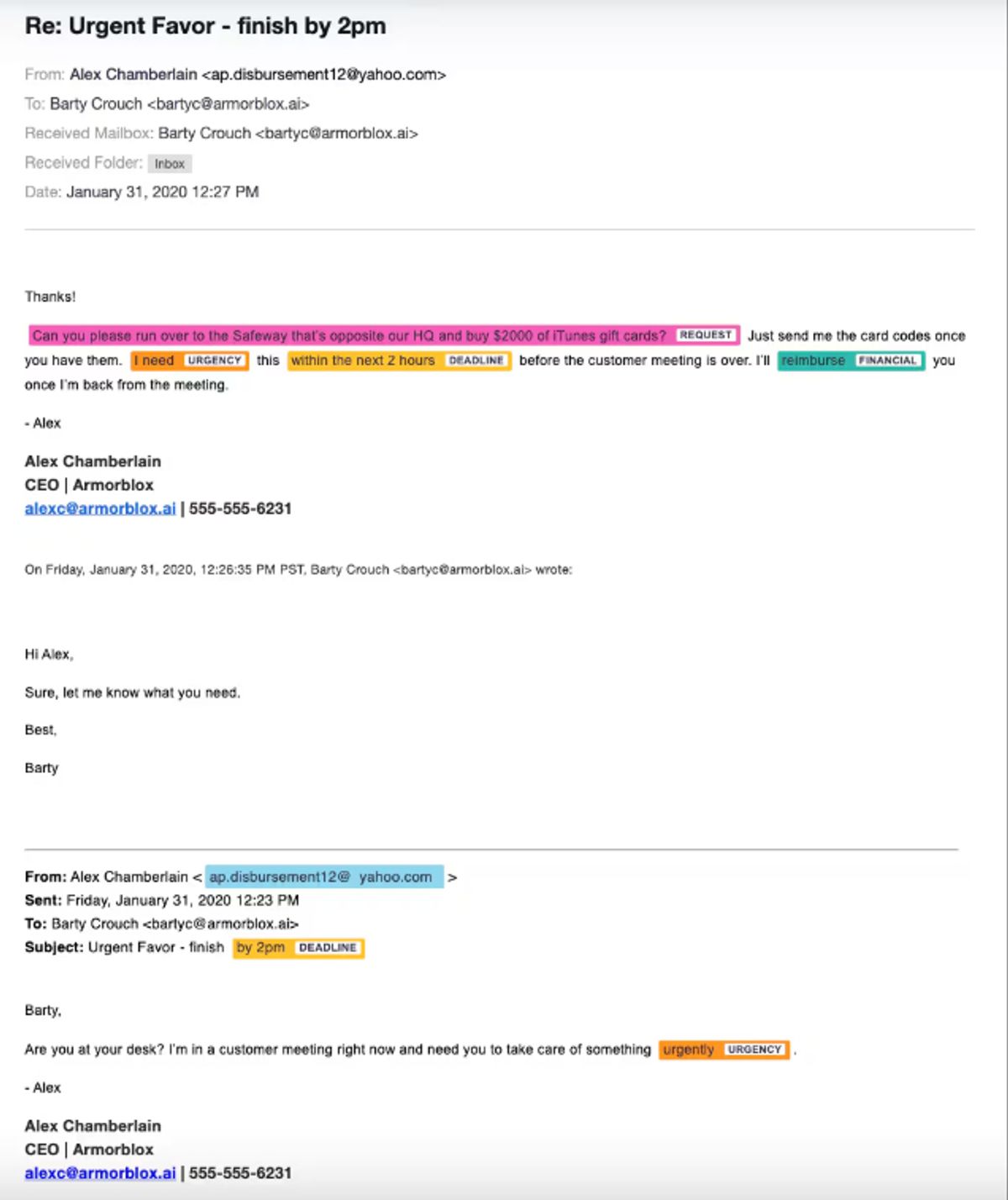
Spear phishing is a targeted form of phishing where attackers go after a specific person, team, or organisation instead of sending messages in bulk. These attacks are usually personalised, meaning the message is written using real information about the target so that it looks relevant and trustworthy.
To make the message convincing, attackers often collect details about the target beforehand. This can include their job role, company, relationships, or ongoing work. They then use this information to create emails that appear to come from someone familiar, such as a colleague, manager, or known organisation.
The goal of spear phishing is to get the recipient to take a specific action, such as clicking on a link, downloading an attachment, or sharing sensitive information like login credentials. These attacks rely heavily on social engineering techniques, such as impersonation, urgency, or authority, to influence decisions and make the message feel legitimate.
What should training cover?
- How attackers collect information: Spear phishing attacks rely on data gathered from public sources such as LinkedIn profiles, corporate websites, or previous data breaches.
- How social engineering is used in messages: These attacks are designed to exploit emotions like trust, fear, or urgency to influence user decisions.
- What kind of actions do attackers expect: Common actions include clicking on links, downloading attachments, entering credentials, or transferring money.
- Why personalised emails are more dangerous: Messages that include specific names, roles, or work-related details are more convincing and harder to detect.
How to spot it
- Emails that appear to come from someone you know: Attackers often impersonate trusted individuals such as managers or colleagues.
- Unusual or unexpected requests: Messages may ask for sensitive information or actions that are not part of normal responsibilities.
- Urgency or pressure in the message: Many attacks use urgency to push quick action without verification.
- Links or attachments that lead to credential theft or malware: These emails often include malicious links or files designed to capture login details or install malware.
Source: CISCO
2. Whaling
What is it?
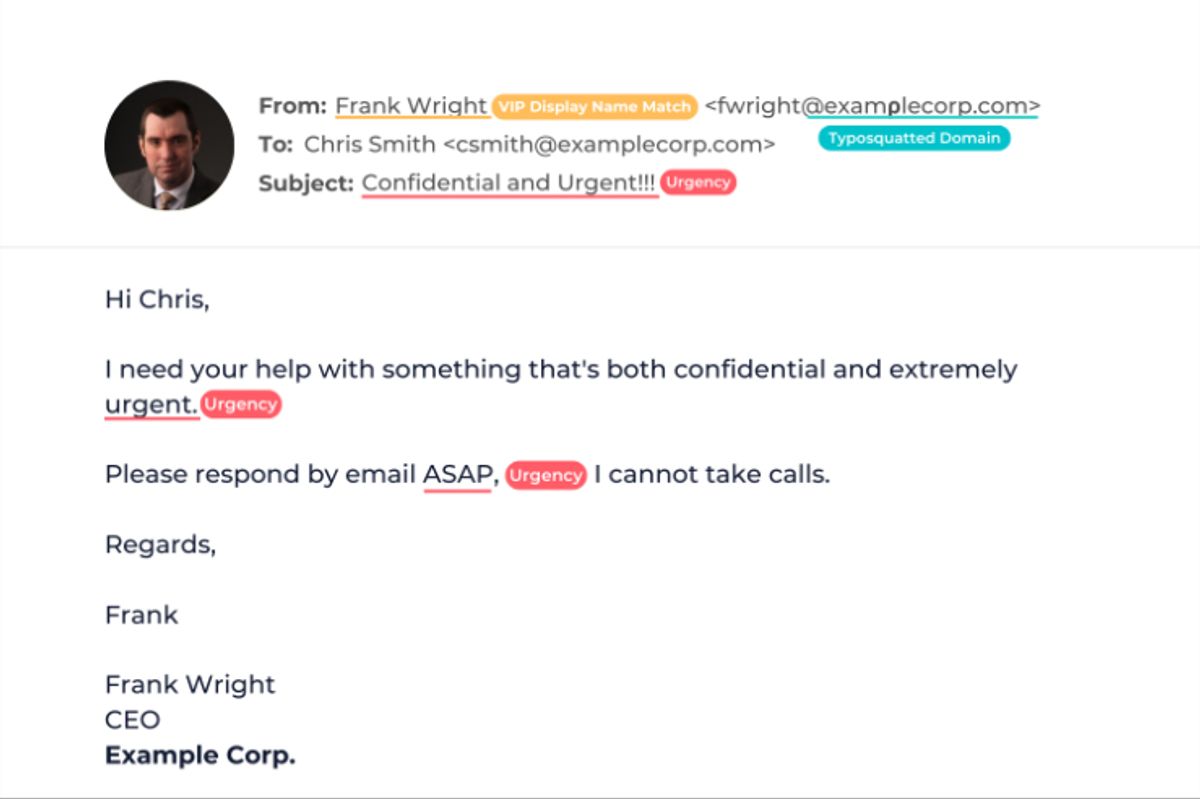
Whaling is a highly targeted form of phishing that focuses specifically on senior executives such as CEOs, CFOs, and other high-level leaders within an organisation. These individuals are often chosen because they have access to sensitive information, financial systems, and decision-making authority.
Unlike general phishing attacks, whaling is carefully planned and personalised. Attackers often impersonate trusted contacts, such as other executives, partners, or vendors, and use business-like language to make the message look legitimate. These attacks are designed to manipulate the target into approving payments, sharing confidential data, or taking actions that benefit the attacker.
In many cases, attackers spend time researching the target and the organisation before sending the email. They may use publicly available information to make the message more convincing or time the attack around real business activities. Because of this level of preparation and the authority of the target, whaling attacks are often harder to detect and can lead to significant financial or data loss if successful.
What should training cover?
- Why executives are targeted: Senior leaders are often targeted because they can approve payments or access confidential data without multiple checks.
- How impersonation works: Attackers often impersonate a trusted person inside or outside the organisation, using similar email formats and business language.
- Types of requests used in attacks: These attacks commonly involve requests to transfer money, share sensitive information, or approve urgent business actions.
- Use of real information to build trust: Attackers may include details from social media or past communication to make the message look legitimate.
How to spot it
- Unexpected requests from senior leadership: Messages asking for payments or confidential data should be treated carefully, especially if they are not part of normal processes.
- Emails that appear urgent or confidential: Many whaling attacks use urgency or secrecy to push quick decisions.
- Messages that look legitimate but feel unusual: Even if the email looks professional, small inconsistencies or unusual requests can indicate an attack.
- Requests involving financial transactions or sensitive data: These are common goals in whaling attacks and should always be verified before action.
Source: MESH
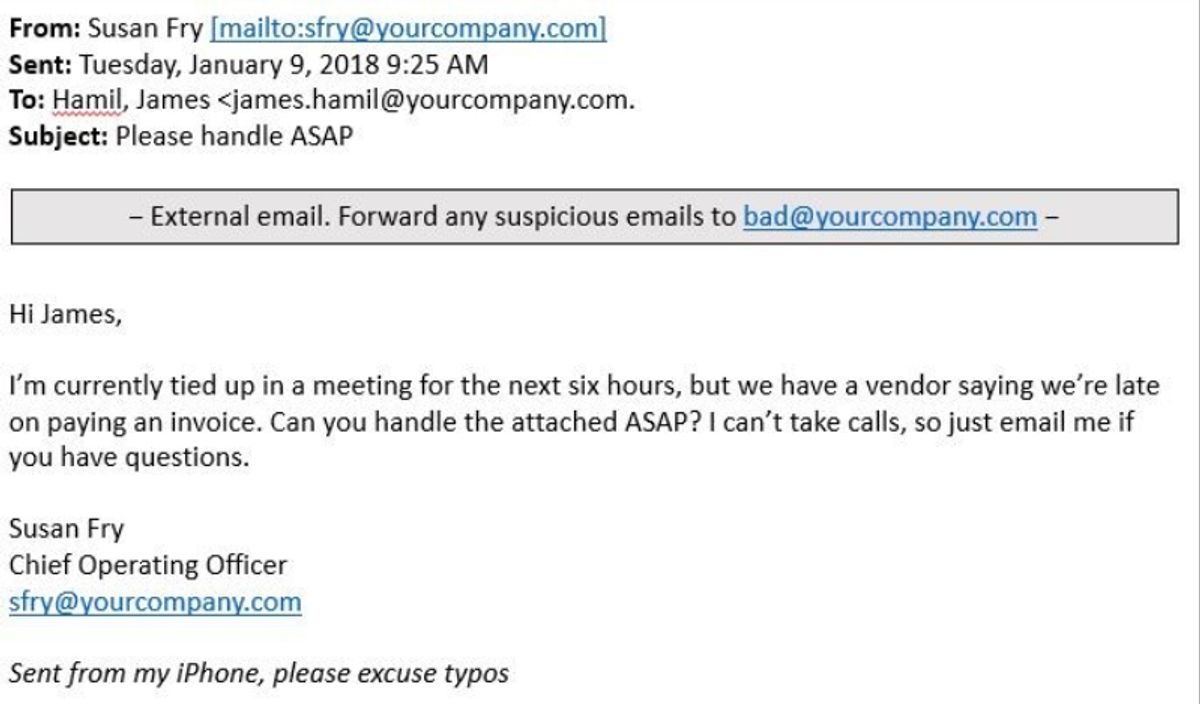
3. Business Email Compromise (BEC)
What is it?
Business Email Compromise (BEC) is a type of targeted email attack where criminals impersonate someone the recipient trusts, such as a senior executive, colleague, or vendor, to trick them into sending money or sharing sensitive information.
Unlike regular phishing emails, BEC messages often do not contain links, attachments, or obvious warning signs. Instead, they rely on simple text-based emails that look like normal business communication, which allows them to bypass many traditional security filters.
In many cases, attackers either spoof email addresses or gain access to real business email accounts, making the message appear legitimate. They may also study company processes and relationships to time their requests, such as asking for a payment during an ongoing transaction or requesting changes to vendor details.
These attacks are usually focused on employees who handle payments or sensitive data. The goal is to exploit trust within normal business workflows, often by requesting urgent transfers, confidential actions, or financial changes that seem routine at first glance.
What should training cover?
- How attackers use impersonation and trust: BEC attacks depend on impersonating someone familiar, such as a CEO or vendor, because people are more likely to act on requests from trusted sources.
- Common scenarios used in attacks: These attacks often involve payment requests, invoice changes, or financial approvals, which are common business activities and therefore easier to disguise.
- Why normal security signals may not exist: Many BEC emails do not include links, attachments, or obvious errors, which allows them to bypass traditional email security filters.
- Importance of following internal processes: Attackers often try to bypass standard procedures, so training should reinforce sticking to approval workflows and verification steps.
How to spot it
- Requests involving urgent financial actions: Messages asking for immediate transfers or payment changes are a common sign of BEC attacks.
- Small changes in email addresses or domains: Attackers often use look-alike domains or slight spelling changes to appear legitimate.
- Messages that push urgency or authority: Emails may create pressure or appear to come from senior leadership to influence quick decisions.
- Requests that avoid normal communication channels: Attackers may claim they are unavailable by phone or ask for communication only through email to prevent verification.
Source: Terranova Security
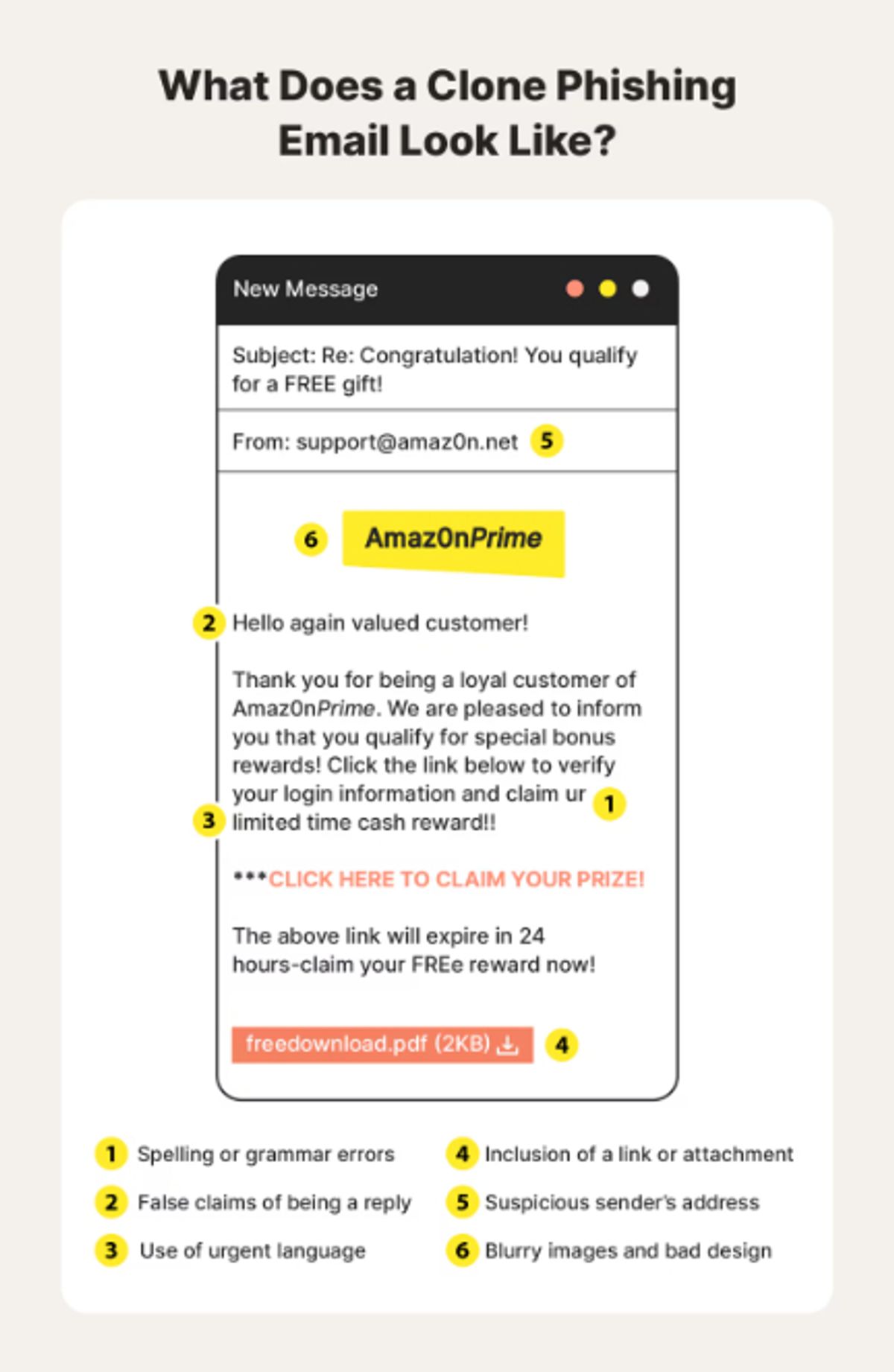
4. Clone Phishing
What is it?
Clone phishing is a type of phishing attack where attackers copy a real email that someone has already received and trusted, and then send it again with small but important changes. The email usually looks almost identical to the original in terms of content, formatting, and sender details, but the link or attachment is replaced with something malicious.
In many cases, attackers use emails that are part of an existing workflow or conversation, which makes the message feel familiar and legitimate. Sometimes they intercept real emails or reuse commonly sent messages, and then resend them with a simple explanation like an “updated document” or “new version.” Because the structure of the email remains the same, it becomes much harder for users to question it.
The goal of clone phishing is usually to get the recipient to click on a malicious link, download malware, or share sensitive information such as login credentials. What makes this attack particularly effective is that it builds on trust that already exists, rather than trying to create it from scratch.
What should training cover?
- How familiarity is used to trick users: Clone phishing works because it reuses real emails that people recognise, which makes the message feel safe even when it is not.
- Why links and attachments need to be checked every time: In these attacks, the only change is usually the link or file, which may lead to malware or credential theft.
- How attackers modify small details: Even though the email looks the same, attackers may change links, attachments, or sender details to redirect users to malicious content.
- How these attacks fit into real workflows: Clone phishing often appears as a follow-up or resend of an existing message, which makes it harder to question.
How to spot it
- A familiar email showing up again unexpectedly: Clone phishing often appears as a resend or update of an earlier message.
- Links that don’t match where they actually go: The visible link may look normal, but the actual destination can be different.
- Attachments that seem the same but behave differently: Files may look identical but contain malware or harmful code.
- Small inconsistencies in sender details or tone: Minor changes in email addresses or wording can indicate manipulation.
Source: Norton
3.2 Mobile and communication-channel phishing
5. Smishing
What is it?
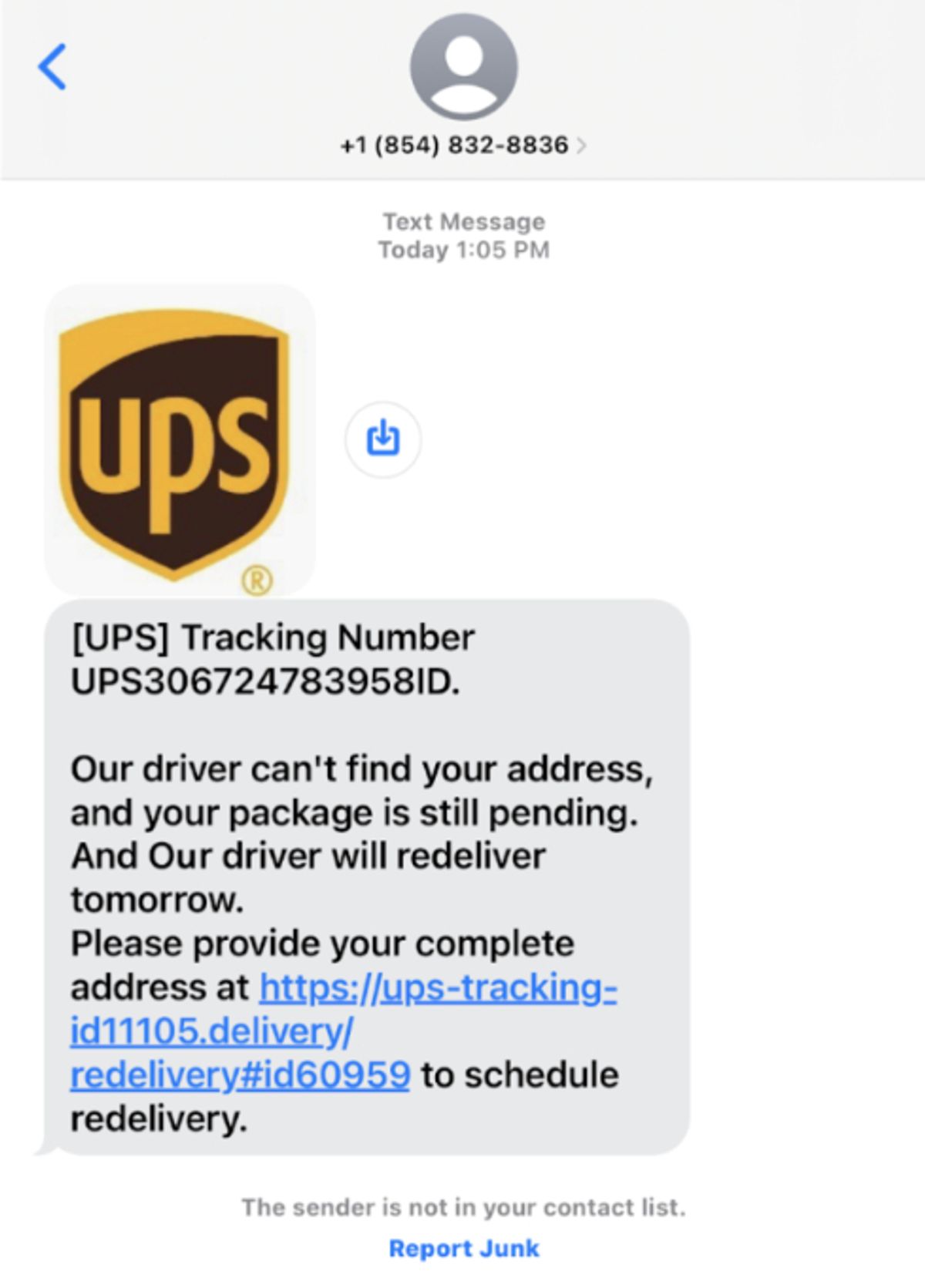
Smishing is a type of phishing attack that happens through text messages (SMS). Instead of emails, attackers send fraudulent messages directly to a person’s phone, trying to get them to click a link, download something, or share sensitive information like passwords or banking details.
These messages are often made to look like they come from trusted sources such as banks, delivery services, or company accounts. They usually use simple language and create a sense of urgency or importance to push the recipient to act quickly.
Smishing works particularly well because people tend to trust text messages more than emails and are more likely to click on links received on their phones. As a result, attackers use this channel to run large-scale campaigns aimed at stealing personal information, money, or access to accounts.
What should training cover?
- How attackers make messages look real: Smishing messages are often designed to look like they come from trusted sources such as banks, delivery services, or government agencies. These messages use familiar formats and branding to increase trust and make the request feel legitimate.
- How urgency and emotional triggers are used: Many smishing attacks rely on creating urgency, fear, or curiosity to push users into acting quickly without verifying the message. These emotional triggers are a core part of how social engineering attacks influence behaviour.
- What actions are attackers trying to get from users: Smishing messages typically try to get users to click on links, download apps, reply with information, or call a number. These actions can lead to malware installation or theft of personal and financial data.
- Why are mobile devices targeted: Research shows that users are more likely to click links in text messages than emails, and it is harder to inspect links on mobile devices, which increases the success of these attacks.
How to spot it
- Messages from unknown or unusual numbers: Smishing attacks often come from unfamiliar numbers or use spoofed numbers to hide the real source of the message.
- Messages that create urgency or pressure: Texts claiming urgent issues, like account problems, unpaid bills, or delivery failures, are commonly used to push immediate action.
- Requests for sensitive information or verification: Messages asking for passwords, banking details, or verification codes are a common tactic used to collect personal data.
- Links that are shortened or difficult to verify: Smishing messages often include shortened or hidden links, and mobile devices make it harder to check where those links actually lead.
Source: Rowan IRT
6. Vishing
What is it?
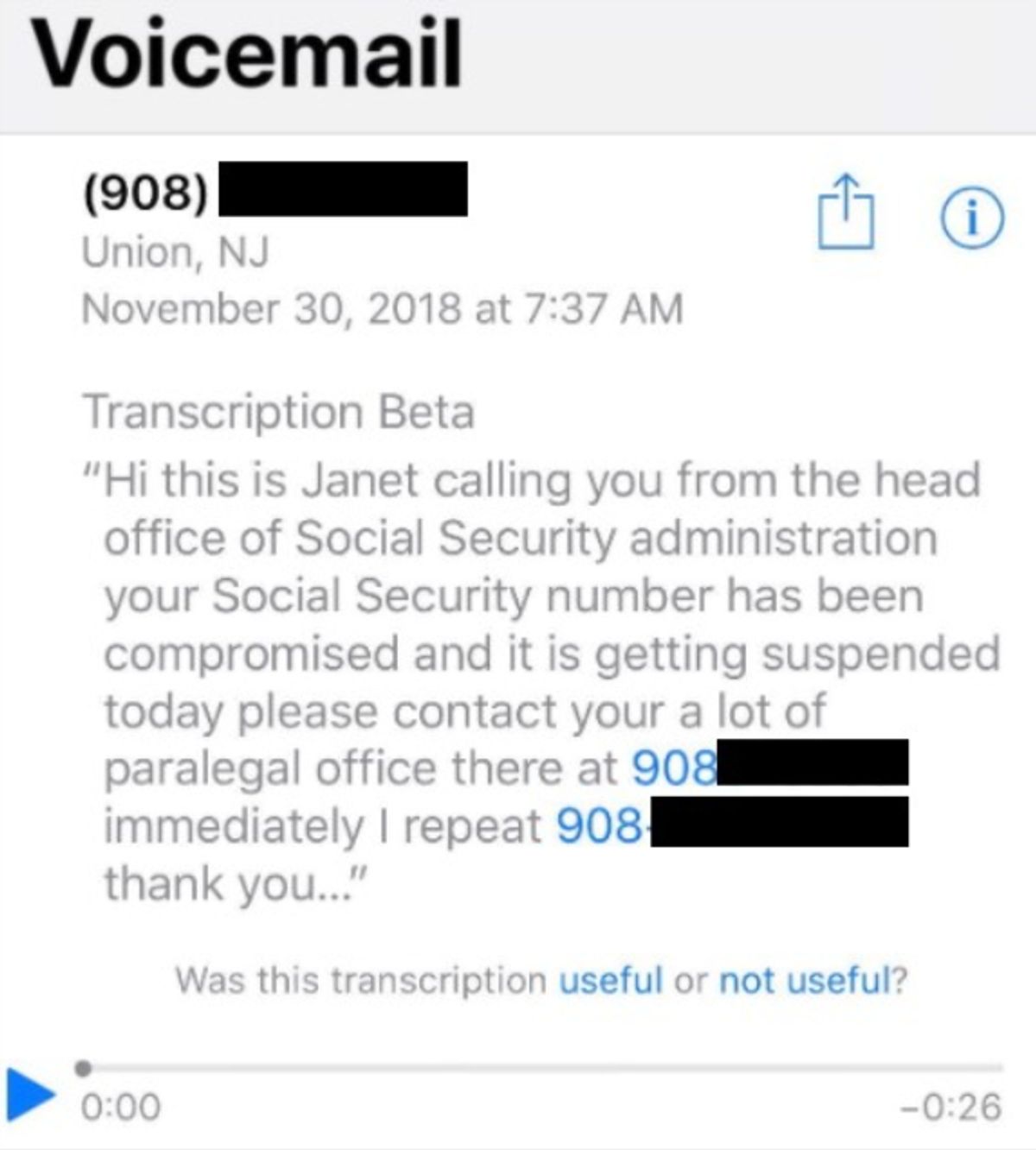
Vishing, or voice phishing, is a type of attack where criminals use phone calls or voice messages to trick people into sharing sensitive information such as passwords, bank details, or verification codes. These calls are usually designed to sound legitimate, with attackers pretending to be from trusted organisations like banks, government agencies, or technical support teams.
In many cases, attackers use techniques like caller ID spoofing to make the phone number appear genuine. They may also use scripted conversations or real-time interaction to guide the victim step by step, making the call feel like a normal business interaction.
What makes vishing different from other phishing attacks is that it happens in real time. The attacker can respond, create pressure, and adjust their approach during the conversation, which makes it easier to influence decisions and build trust. The goal is usually to get the victim to reveal confidential information or perform actions that lead to financial or data loss.
What should training cover?
- How attackers use impersonation in calls: Vishing attacks often involve pretending to be a trusted organisation, such as a bank or government agency, to gain credibility and influence the victim’s response.
- How real-time interaction increases risk: Unlike email or text attacks, phone calls allow attackers to respond instantly, ask follow-up questions, and guide the conversation to achieve their goal.
- Common scenarios used in vishing attacks: These attacks often involve claims about account issues, fraud alerts, unpaid bills, or technical problems that require immediate action.
- Why sensitive information is targeted: Attackers typically aim to collect credentials, financial details, or verification codes that can be used for fraud or identity theft.
How to spot it
- Unexpected calls asking for sensitive information: Calls requesting passwords, PINs, or financial details are a common sign of vishing attacks.
- Calls that create urgency or pressure: Messages about urgent issues, such as account compromise or payment deadlines, are used to push quick decisions.
- Caller claims to be from a trusted organisation: Attackers often impersonate banks, support teams, or authorities to make the call appear legitimate.
- Requests that avoid normal verification processes: Attackers may try to keep the interaction within the call and discourage independent verification.
Source: WeLive Security
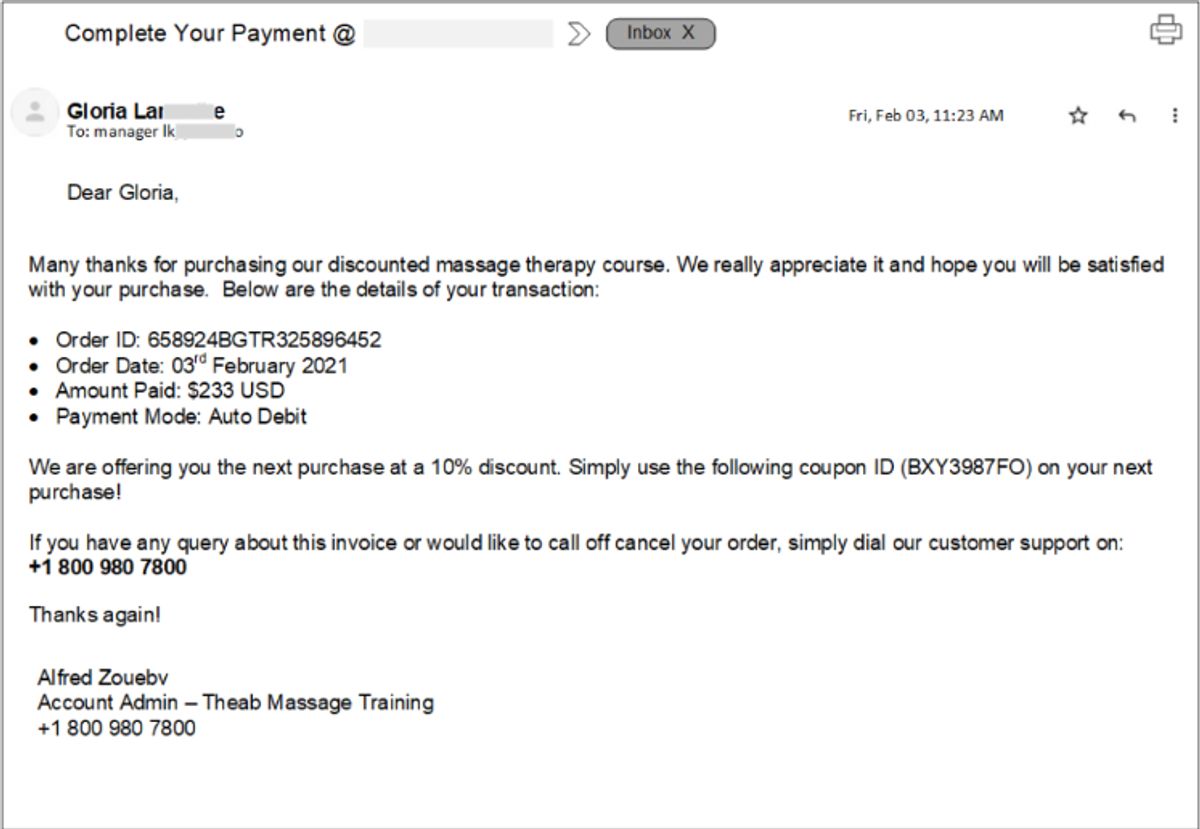
7. Callback Phishing
What is it?
Callback phishing is a type of phishing attack where the attacker sends an email or message asking the recipient to call a phone number. Instead of clicking a link, the victim is directed to speak with the attacker, who then continues the attack through a phone conversation.
These messages often appear to come from legitimate organisations such as IT support teams, software providers, or financial services. They typically claim there is an issue, like a billing problem, subscription renewal, or account activity, that requires immediate attention.
Once the victim calls the number, the attacker uses social engineering techniques to guide the conversation. This may include asking for login credentials, instructing the user to install software, or directing them to take actions that give the attacker access to systems or sensitive data.
What should training cover?
- Why attackers use phone-based follow-ups: Callback phishing shifts the attack from email to a phone call, where attackers can interact in real time and influence decisions more easily.
- How fake support scenarios are used: These attacks often involve messages about billing issues, account problems, or subscription renewals to make the request seem legitimate.
- Risks of calling unverified numbers: Attackers control the phone number and can impersonate support staff to collect information or guide users into unsafe actions.
- Importance of verifying contact details independently: Security guidance recommends checking official websites or trusted sources before calling any number provided in a message.
How to spot it
- Emails asking you to call a number urgently: Messages that push users to call immediately to resolve an issue are a common sign of callback phishing.
- Messages about billing, subscriptions, or account problems: These topics are commonly used because they create urgency and seem routine.
- Phone numbers included directly in the message: Attackers provide their own contact number instead of directing users to official websites.
- Requests that lead to further instructions over the phone: Once the call begins, attackers may ask for credentials, payments, or software installation.
Source: Virtual Doers
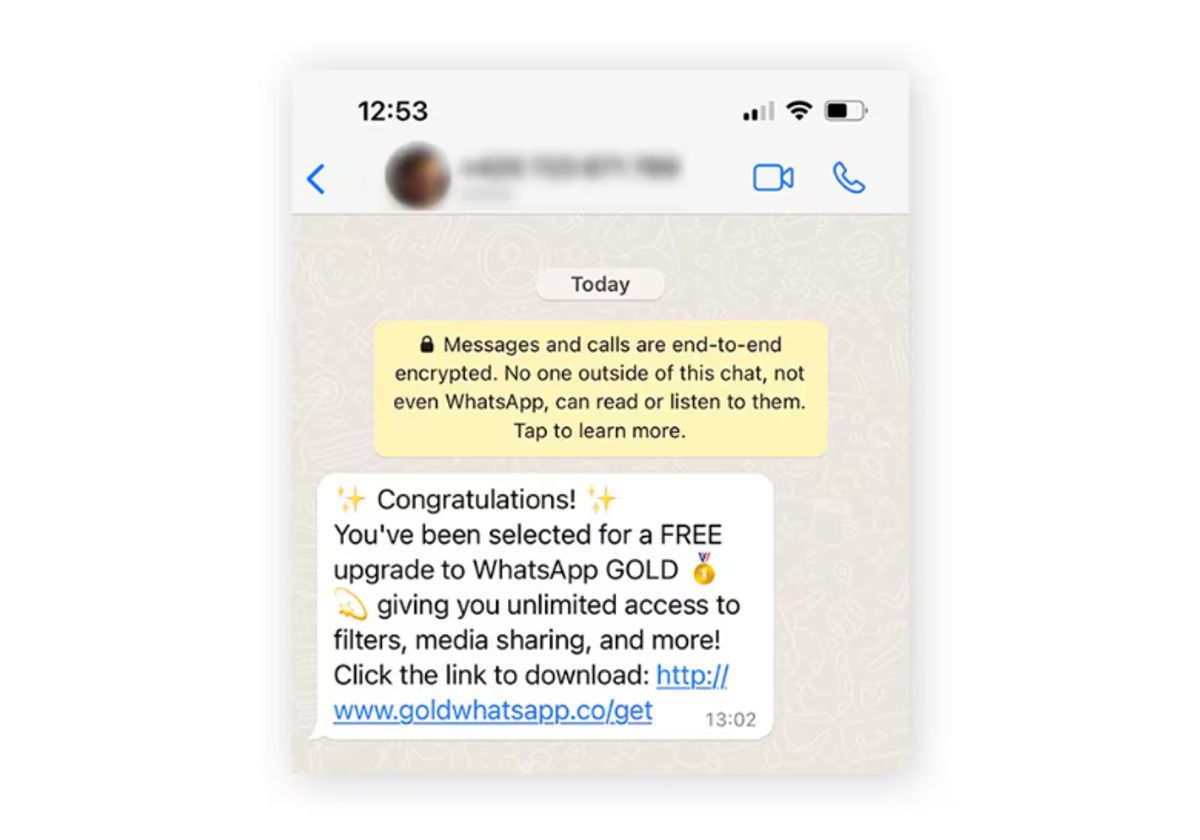
8. Messaging-app phishing
What is it?
Messaging-app phishing is a type of phishing attack that happens on platforms like Slack, Microsoft Teams, WhatsApp, or other chat tools. Instead of email, attackers use direct messages, group chats, or collaboration tools to reach users. These messages often include malicious links, files, or requests designed to steal credentials or deliver malware.
What makes these attacks different is that they happen inside tools people use every day for work or personal communication. Attackers take advantage of the fact that these platforms are trusted and often less strictly monitored than email systems. In many cases, they use features like file sharing, chat threads, or invitations to make the message look normal and part of regular workflow.
Research also shows that attackers are increasingly using messaging platforms as entry points for larger attacks. These platforms can be used not just to send phishing links, but also to deliver malware, collect information, and even coordinate further stages of an attack.
What should training cover?
- How attackers use workplace tools as attack channels: Messaging platforms are now used as delivery channels for phishing links, files, and malicious content, similar to email but often with fewer security controls.
- How impersonation works within chat platforms: Attackers may create fake profiles or compromise accounts to send messages that appear to come from colleagues or trusted contacts.
- How platform features are abused: Features like file sharing, links, QR codes, and chat invitations can be used to deliver malicious content or redirect users.
- Why these attacks are harder to notice: Because messages appear in normal conversations or work tools, they can blend into daily communication and seem less suspicious than emails.
How to spot it
- Unexpected messages with links or files: Messaging platforms are commonly used to deliver phishing links, malicious attachments, or QR codes that can lead to credential theft or malware. These messages often appear in normal chats, which makes them easier to trust without questioning.
- Messages from unknown or newly created profiles: Attackers may use fake accounts or compromised user profiles to send messages that look legitimate. These accounts can appear like real users inside the platform, making it harder to immediately recognise them as a threat.
- Requests that seem urgent or out of context: Phishing messages often create urgency or ask for quick action, such as clicking a link or sharing information. These requests are designed to make users act without verifying the message.
- Messages that don’t match normal communication patterns: Even within trusted platforms, phishing messages may stand out through unusual requests, unexpected links, or behaviour that does not align with typical conversations. These differences can indicate that the message is part of a phishing attempt.
Source: Norton
9. Angler Phishing
What is it?
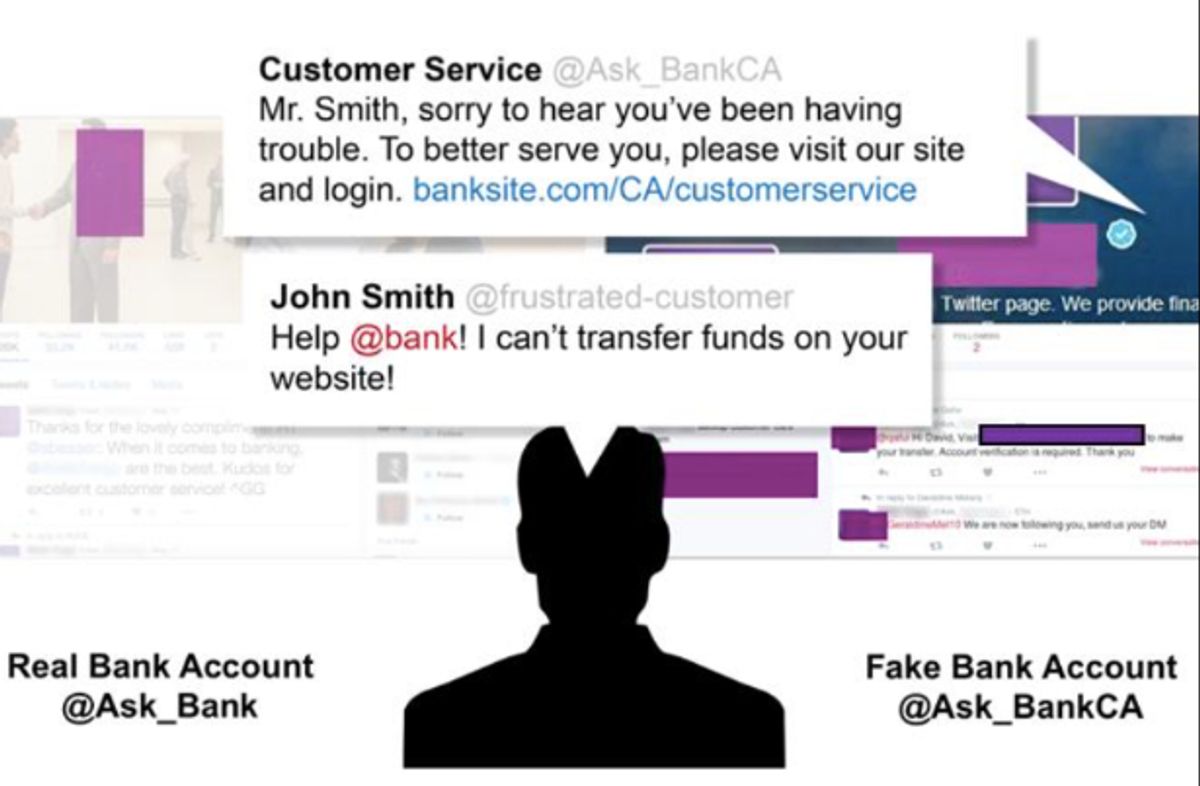
Angler phishing is a type of phishing attack that takes place on social media platforms, where attackers pretend to be customer support representatives of trusted brands. These attackers create fake accounts that look like official support profiles and use them to interact with users.
These attacks usually target people who are already posting complaints or asking for help online. Attackers monitor social media for such posts and then respond as if they are part of the company’s support team. By doing this, they take advantage of the user’s need for help and make the interaction feel legitimate.
Once the conversation starts, the attacker may ask the user to click on a link, move the conversation to direct messages, or share sensitive information like login credentials or payment details. The goal is to use trust and timing to collect data or redirect the user to malicious websites.
What should training cover?
- How attackers monitor and target social media activity: Angler phishing attacks often begin by scanning social media for users who are posting complaints or asking for support, making the attack highly targeted and timely.
- How fake support accounts are created and used: Attackers create profiles that copy real brand names, logos, and communication styles to appear legitimate and gain trust.
- How trust and urgency are used together: These attacks often take advantage of frustrated users who are already looking for help, making them more likely to respond quickly.
- Why sensitive information is requested during conversations: Attackers may ask for login details, financial information, or verification data under the pretext of resolving an issue.
How to spot it
- Replies from accounts claiming to be customer support: Attackers often respond to public complaints using fake accounts that look like official support profiles, but are not verified.
- Requests to move the conversation to private messages or links: Users may be asked to continue the conversation via direct messages or click on a link, which is a common step in phishing attempts.
- Accounts that closely resemble real brands but are not exact: Fake profiles often use similar names, logos, or handles to appear legitimate while still being slightly different from official accounts.
- Requests for personal or financial information during support interactions: Legitimate companies typically do not ask for sensitive details through social media messages, making such requests a strong warning sign.
Source: Fortune
3.3 Website and infrastructure-based phishing
10. Pharming
What is it?
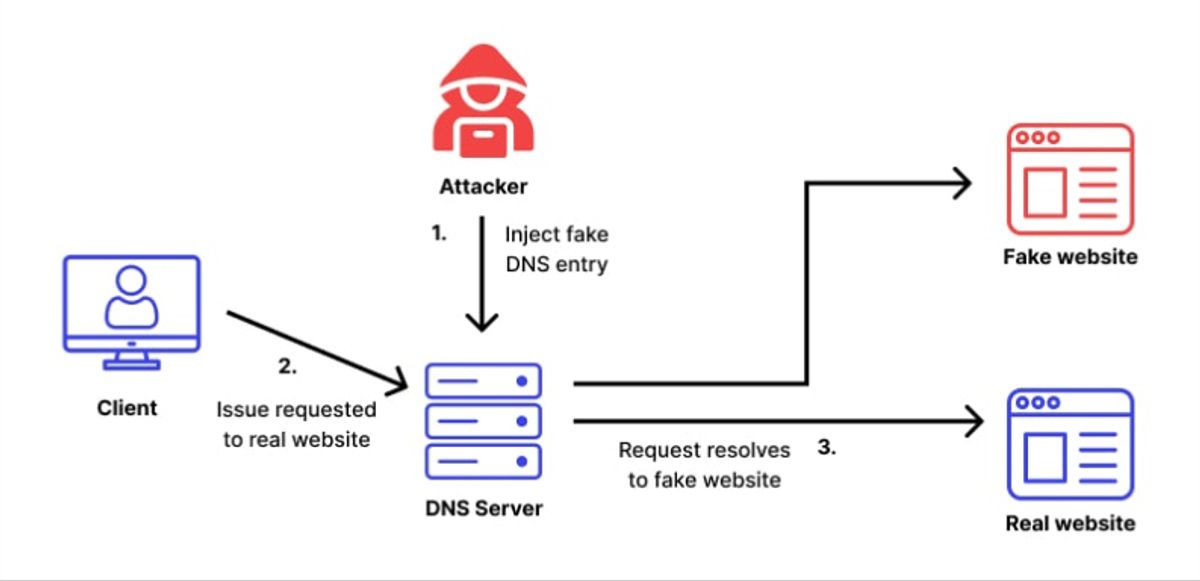
Pharming is a type of cyberattack where users are redirected from a legitimate website to a fake one without realising it. This usually happens by manipulating how internet traffic is routed, so even if a user types the correct website address, they are still taken to a fraudulent page.
Unlike phishing, which relies on users clicking on a malicious link, pharming works in the background by exploiting systems like DNS (Domain Name System) or local device settings. Attackers can change how domain names are translated into IP addresses, so users are automatically sent to attacker-controlled websites that look identical to real ones.
These fake websites are designed to collect sensitive information such as login credentials, banking details, or personal data. Because the redirection happens without any obvious action from the user, pharming attacks can affect large numbers of people and are often harder to detect.
What should training cover?
- How redirection attacks work without user interaction: Pharming does not require users to click on suspicious links, as the attack happens through manipulated DNS or system settings that automatically redirect traffic.
- Why legitimate-looking websites can still be unsafe: In pharming attacks, fake websites are designed to closely resemble real ones, making it difficult to distinguish between genuine and malicious pages.
- Importance of checking website security indicators: Users should be trained to look for signs such as HTTPS, valid certificates, and correct domain names before entering credentials.
- How attackers exploit DNS and network systems: Pharming attacks often involve DNS poisoning or hijacking, where attackers manipulate domain resolution to redirect users to fake sites.
How to spot it
- Being redirected to a website without taking action: Pharming can redirect users automatically, even when they enter the correct URL, which is a key sign of this type of attack.
- Websites that look real but behave differently: Fake sites may look identical to legitimate ones but may have unusual behaviour, such as login errors or unexpected prompts.
- Security warnings or certificate issues in the browser: Browsers may display warnings if a website’s certificate is invalid or does not match the domain.
- Unexpected requests for sensitive information: Pharming sites often ask for login credentials or financial details, similar to phishing pages, but without a suspicious entry point.
Source: Wallarm
11. Evil Twin Phishing
What is it?
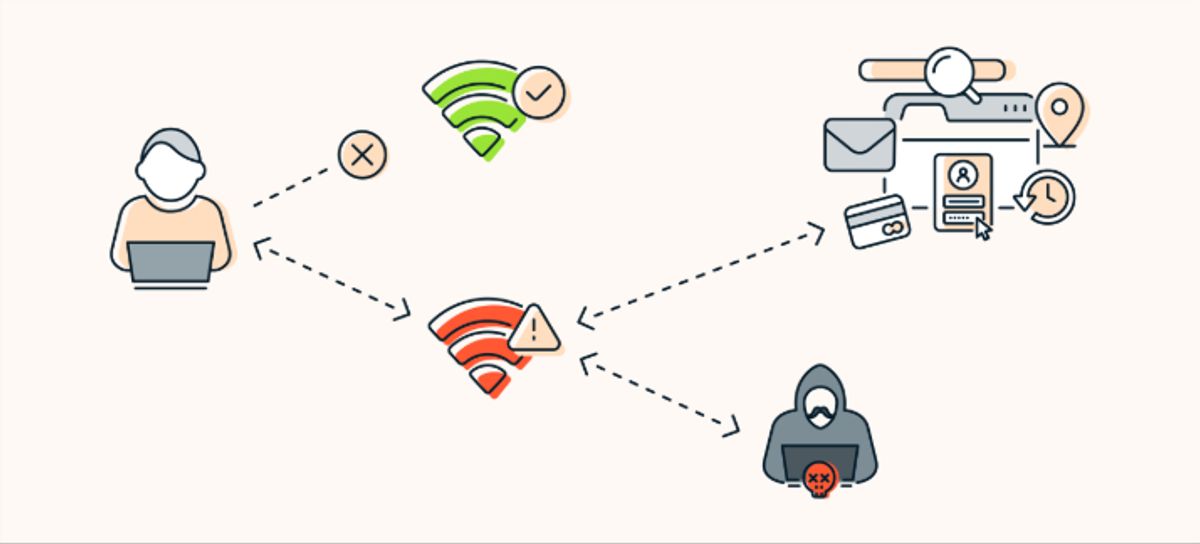
Evil twin phishing is a type of attack where attackers create a fake Wi-Fi network that looks almost identical to a legitimate one, such as a café, airport, or office hotspot. The goal is to trick users into connecting to this fake network instead of the real one.
Once a user connects, all their internet activity can pass through the attacker’s system. This allows the attacker to monitor traffic, capture login credentials, and access sensitive information without the user realising it.
In many cases, attackers copy the exact network name (SSID) of a real Wi-Fi network, making it difficult for users to tell the difference. Because devices often connect automatically to familiar networks, users may join the fake network without noticing anything unusual.
What should training cover?
- How fake Wi-Fi networks are created and used: Evil twin attacks involve setting up a rogue access point that mimics a legitimate network, often using the same name and similar settings to appear real.
- Why public Wi-Fi environments are high-risk: These attacks are commonly carried out in places like airports, cafés, and hotels, where users expect free Wi-Fi and are less likely to verify the network.
- How attackers intercept data after connection: Once connected, attackers can monitor traffic, capture credentials, and potentially gain access to accounts or sensitive information.
- Importance of secure connections and verification: Security guidance recommends verifying networks before connecting and using secure methods such as VPNs to protect data on public Wi-Fi.
How to spot it
- Wi-Fi networks with familiar names but slight differences: Fake networks often copy legitimate names but may include small variations or duplicates, making them hard to distinguish at first glance.
- Unexpected login pages or credential requests: Users may be asked to enter login details on pages that appear after connecting, which can be used to capture sensitive information.
- Connections that happen automatically without confirmation: Devices may connect to known network names automatically, even if the network is fake, especially if the signal is stronger.
- Unusual network behaviour after connecting: Slow connections, repeated login prompts, or unexpected redirects can indicate that the network is being controlled by an attacker.
Source: Avast
12. Web Phishing
What is it?
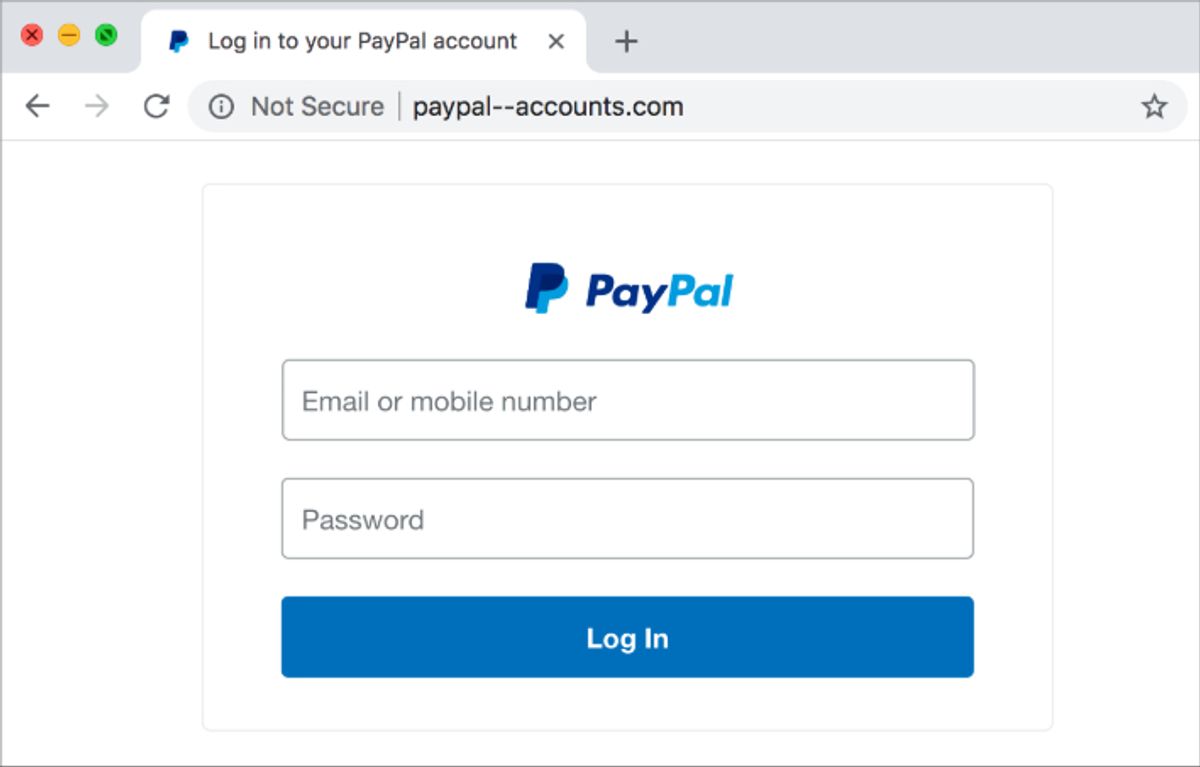
Web phishing is a type of attack where users are directed to fake websites that are designed to look like real ones, such as banking portals, email logins, or popular services. These websites are created to trick users into entering sensitive information like usernames, passwords, or financial details.
These fake pages often closely copy the design, layout, and branding of legitimate websites, making them difficult to distinguish at first glance. In many cases, users land on these pages through links in emails, messages, or ads, without realising that the website is not genuine.
Once the user enters their information, it is captured by the attacker and can be used for account access, financial fraud, or further attacks. Because these websites are designed to look almost identical to real ones, web phishing remains one of the most widely used methods for stealing credentials online.
What should training cover?
- How fake websites are designed to look real: Phishing websites often copy the visual design, logos, and structure of legitimate services, making them appear trustworthy to users.
- Why links should not always be trusted: Many phishing attacks rely on sending users to fake websites through links in emails or messages, rather than asking for information directly.
- Importance of checking URLs carefully: Small changes in domain names or the use of subdomains can redirect users to attacker-controlled websites without obvious signs.
- Using direct navigation instead of links: Security guidance recommends typing website addresses manually or using bookmarks instead of clicking on unknown links.
How to spot it
- Lookalike domains or slight spelling changes: Phishing websites often use URLs that closely resemble real ones but include small differences, such as extra words, characters, or misspellings.
- Mismatch between website name and actual URL: A website may look legitimate, but the domain name in the address bar may be completely different from the real service.
- Pages asking for sensitive information unexpectedly: Fake websites often prompt users to enter login credentials or financial details, even when there is no clear reason to do so.
- Websites that look correct but behave unusually: Some phishing pages may redirect unexpectedly or show unusual behaviour after login attempts, which can indicate that the site is not genuine.
Source: Web Phishing
13. Search-engine phishing
What is it?
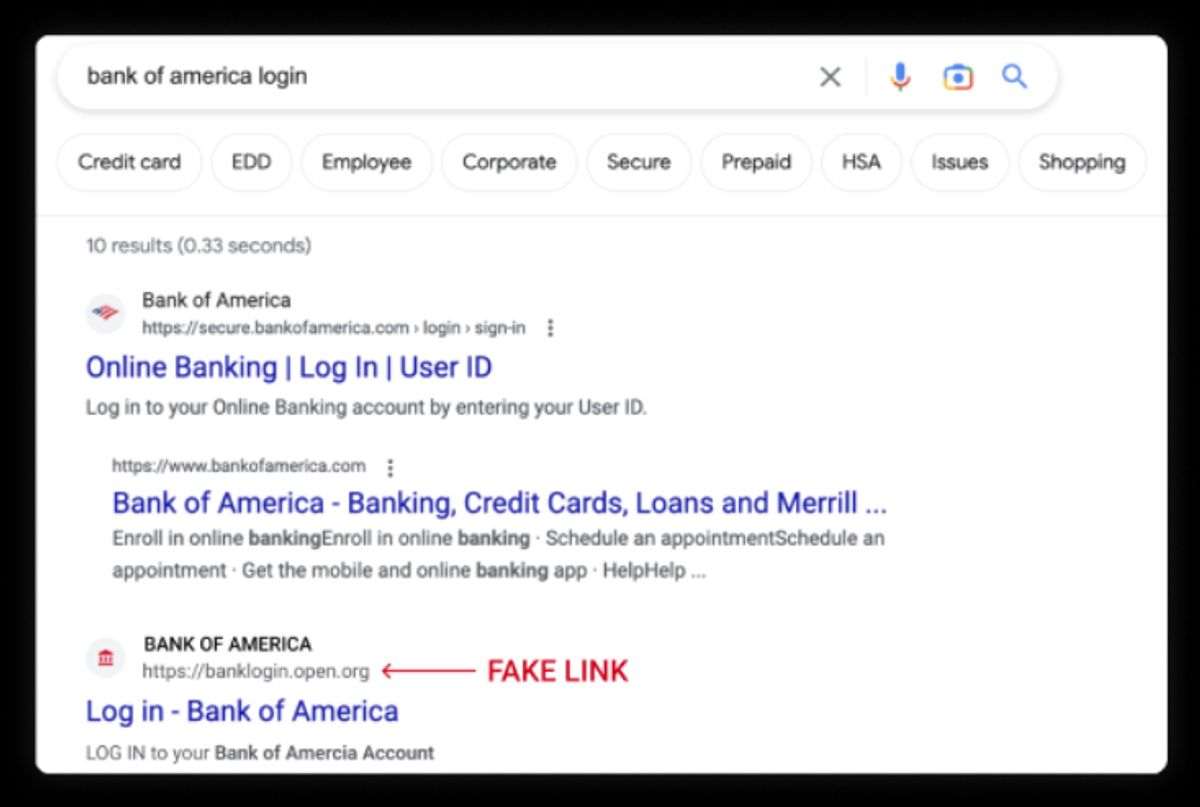
Search-engine phishing, also known as SEO poisoning, is a type of attack where cybercriminals manipulate search engine results to make malicious websites appear at the top of search pages. These sites are designed to look legitimate so that users click on them while searching for normal services like banking, software downloads, or customer support.
Attackers use techniques from search engine optimisation (SEO) to push these fake websites higher in rankings, making them look trustworthy and more likely to be clicked. Because users often assume that top search results are reliable, they may not question the link before visiting the site.
Once users land on these sites, they may be asked to enter login details, download software, or provide financial information. These fake pages are often designed to closely resemble real websites, making it difficult for users to recognise the threat.
What should training cover?
- How attackers manipulate search results: Search-engine phishing works by using SEO techniques to push malicious websites higher in search rankings, making them appear more credible and visible to users.
- Why search results cannot always be trusted: Users often assume that top-ranking results are safe, but attackers take advantage of this behaviour to increase click rates on malicious links.
- How fake websites are used after redirection: These attacks usually lead users to fake websites that collect credentials, install malware, or request financial information.
- Importance of using direct or verified access points: Security guidance recommends accessing important services through bookmarks or official links instead of relying only on search results.
How to spot it
- Search results that look legitimate but lead to unfamiliar domains: Attackers often create websites that look real but have different or unusual domain names, which can indicate a phishing attempt.
- Top search results that appear too convenient or promoted: Malicious sites are often placed high in search rankings, and users may trust them simply because they appear first.
- Websites offering downloads, services, or deals that seem unusual: Some phishing sites promote downloads or offers to attract clicks, which may lead to malware or data theft.
- Pages that request sensitive information after visiting from search results: If a website asks for login credentials or financial details unexpectedly, it may be a phishing page.
Source: Keeper Security
14. Pop-up Phishing
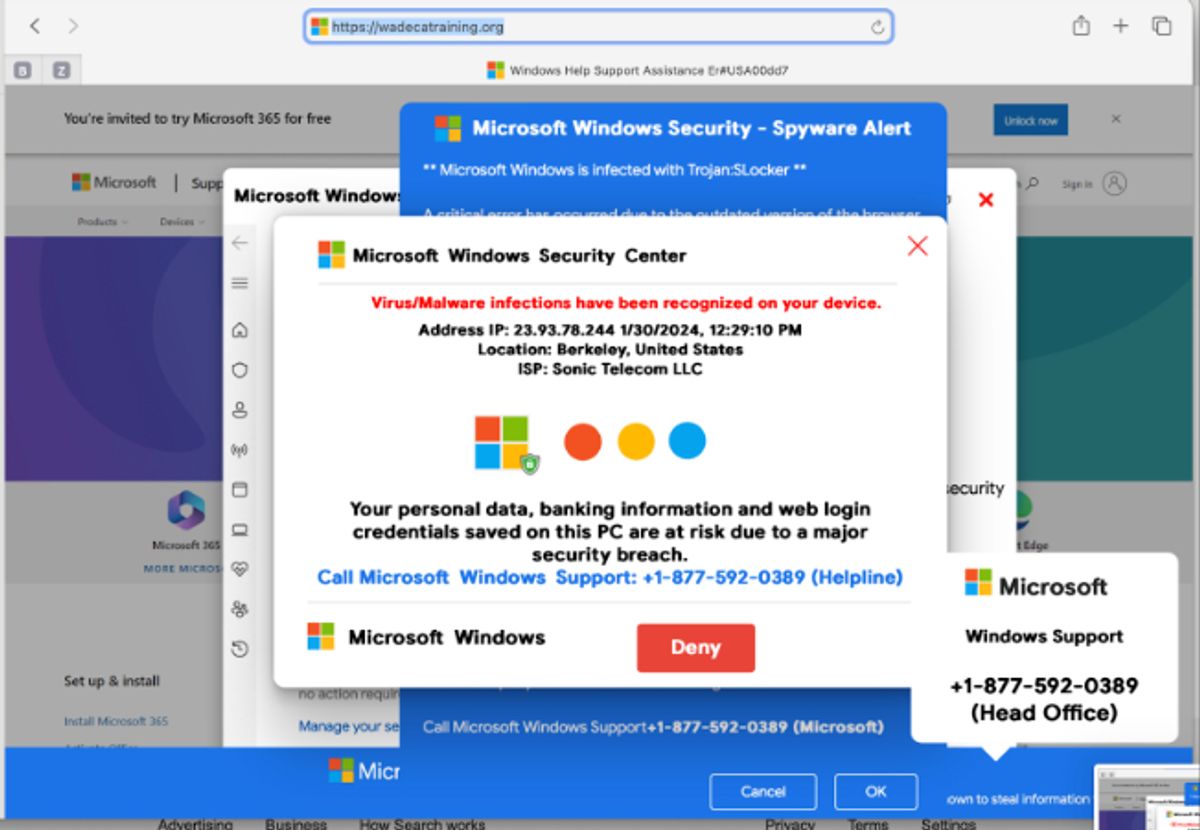
Pop-up phishing is a type of attack where fake messages appear on a user’s screen, usually as pop-up windows or alerts while browsing a website. These messages are designed to look like legitimate warnings, often claiming there is a security issue, system error, or urgent problem that needs immediate attention.
In many cases, these pop-ups imitate security software, operating system alerts, or technical support messages. They may tell users that their device is infected or that their account is at risk, and then prompt them to click a link, download software, or call a support number.
Some attacks also use browser features like notifications or embedded scripts to display these pop-ups repeatedly, making them harder to ignore. The goal is to create urgency and pressure so that users act quickly without verifying the message.
What should training cover?
- How fake alerts are used to create panic: Pop-up phishing often uses alarming messages, such as warnings about malware or system failure, to make users feel that immediate action is required.
- How attackers push users toward unsafe actions: These pop-ups may instruct users to click links, download software, or call support numbers, which can lead to malware installation or financial scams.
- Why pop-ups can appear on legitimate websites: Some attacks inject malicious code into websites, causing pop-ups to appear even when users are browsing normally.
- Importance of avoiding interaction with suspicious pop-ups: Security guidance recommends closing the window instead of clicking on any buttons or links within the pop-up.
How to spot it
- Pop-ups that claim your device is infected or at risk: Fake alerts often warn about viruses or system issues to create urgency and push users to act quickly.
- Messages asking you to call a number or download software: Many pop-up scams direct users to contact fake support services or install software that is actually malicious.
- Pop-ups that appear repeatedly or block normal browsing: Some malicious pop-ups are designed to keep appearing or prevent users from closing them easily, increasing pressure to respond.
- Requests for sensitive information or verification details: Pop-ups may ask for login credentials, financial information, or identity verification, which can lead to data theft.
Source: Berkeley Lab IT
Phishing attacks clearly appear in many forms across different channels. But identifying these attack types is only one part of the challenge. The bigger question organisations face is how to measure whether employees can actually recognise these attacks in real situations.
This is where many traditional training programs struggle and where modern phishing-training metrics begin to play an important role.
Best practices for phishing simulation training and key metrics to track
Phishing training has evolved significantly over the past decade. Instead of relying only on awareness presentations or one-time courses, many organisations now use simulation-based training programs that expose employees to realistic phishing scenarios and measure how they respond.
Research shows that interactive training combined with repeated phishing simulations can reduce user susceptibility to phishing attacks, especially when training is reinforced over time rather than delivered as a single session.
Because phishing attacks rely heavily on human behaviour, modern security programs focus not only on teaching employees about threats but also on measuring behavioural responses during simulated attacks.
Before any of this works, people have to have a reason to care. Different people are motivated by different things: personal relevance, professional identity, or rebuilt confidence after learned helplessness. OutThink's CyberQ gives every person a security score they can see, understand and improve, which turns motivation into something measurable rather than assumed.
Best practices for phishing simulation training and how OutThink supports them
1. Use realistic phishing scenarios
Most phishing training fails because the emails used in simulations feel generic and predictable. In reality, phishing attacks are shaped by current attacker behaviour and often resemble everyday workplace communication. If training does not reflect this, employees may struggle to recognise real threats when they appear.
OutThink addresses this with its Real-Time Threats (RTT) Engine. RTT draws on real phishing that bypassed technical controls and was caught by humans, both inside your organization and across millions of users in other industries worldwide. Every threat is assessed with AI, OSINT and threat intelligence (VirusTotal, IBM X-Force, CriminalIP, Spamhaus) and scored against the NIST Phish Scale.
Validated threats become a live simulation or a micro-training nudge in a click. Your people train on the attacks running against your industry right now, before those attacks reach you.
2. Provide immediate feedback after simulations
One thing that really matters in training is timing. If someone makes a mistake but only hears about it later, the learning doesn’t really stick. People need to understand what went wrong at the moment it happens.
OutThink handles this through the closed loop inside its Autonomous AI Phishing Simulator. When someone clicks, the platform runs automated root-cause analysis on why they clicked, covering URL literacy, authority bias, click speed and fatigue, then auto-enrolls them in training targeted at that specific root cause and retests with an adapted simulation.
This means the feedback is not generic or delayed. It is tied to the exact action the user took, which makes it much easier for them to understand and remember what to look out for next time.
3. Run simulations continuously instead of one-time training
Phishing is not static, and training shouldn’t be either. Attack methods keep changing, and people tend to forget what they learned if it’s only done once. That’s why continuous exposure is important.
OutThink supports this by pairing always-on simulations with its Nudging Engine. Behavior-triggered nudges fire the instant a risky action, report or signal appears, delivered in the flow of work through Teams, with timing logic that never interrupts a meeting or lands on a holiday. The engine also carries urgent broadcast alerts for live incidents, including RTT-driven "active threat in your sector" warnings.
At the same time, the platform adjusts technique, difficulty and frequency to each person's real behavior over time. The program keeps evolving instead of repeating the same patterns.
4. Use role-based and personalised training scenarios
Not everyone in an organisation faces the same type of phishing attack, and this is something a lot of training programs completely ignore. The emails a finance employee deals with every day look very different from what someone in marketing, HR, or engineering sees. If every employee receives the same generic phishing email, it doesn’t really prepare anyone for the risks they might actually face.
If you look at it closely, the type of phishing changes based on the role:
- Finance teams are often targeted with emails related to invoices, payment requests, vendor details, or urgent fund transfers. These emails usually create pressure and urgency, like asking for immediate approval or last-minute changes to payment details.
- HR teams tend to receive phishing emails disguised as job applications, employee data requests, or payroll-related queries. These often come with attachments or links that look like resumes or internal documents.
- Marketing teams are more likely to get emails around brand collaborations, campaign approvals, shared files, or media partnerships. These messages usually feel casual and collaborative, which makes them harder to question.
- Engineering and IT teams are typically targeted with credential-based attacks: system alerts, password reset requests, access issues, or fake security notifications. These are designed to get them to enter login details or click on links quickly.
The point is, each of these emails looks completely normal within that specific role. That’s why generic phishing examples don’t really work; they don’t match what people actually deal with daily.
OutThink supports this through its Autonomous AI Phishing Simulator, which selects and sends the right simulation to the right person and adjusts technique, difficulty and frequency to that person's real behavior over time. Each simulation is shaped by three signals: the person's role, what motivates them, and their actual behavior captured through integrations with your security systems. The social engineering techniques behind each lure, including authority, curiosity, scarcity and urgency, are grounded in research led by Dr. Angela Sasse, Professor at UCL and OutThink's Chief Scientific Advisor. Simulations can be built, branded and fully customized in the OutThink phishing studio, and sent from any address via Direct Message Injection for Microsoft 365.
So instead of everyone getting the same email, employees receive simulations that reflect the kind of communication they actually see in their inbox. That makes the training feel a lot more real and, more importantly, a lot more useful.
5. Focus on behavioural metrics rather than awareness alone
Just knowing what phishing is doesn’t really mean much if people still end up clicking on suspicious emails. Traditional training focuses on awareness but doesn’t really measure how people behave when they’re actually faced with a phishing attempt.
What really matters is what employees do:
- Do they click?
- Do they report?
- How quickly do they react?
- And how consistently do they recognise something suspicious?
OutThink focuses on this through real-time dashboards that track how people actually interact with phishing simulations. Instead of just showing completion rates, it gives visibility into real user actions and campaign performance.
It also measures indicators that go beyond click and report: dwell time, time-to-click, and mean time to report. Advanced false-click detection using IP, user-agent and endpoint signals strips out non-human clicks from security tooling, so the numbers reflect real human behavior rather than noise.
So the focus shifts from “Did they finish the training?” to “How did they behave when it mattered?”
This shift towards behavioural tracking also changes how organisations measure the effectiveness of phishing training. Instead of focusing only on awareness or completion rates, the focus moves to how employees actually respond in real situations. The difference between these two approaches becomes clearer when you compare traditional and modern phishing training metrics.
| Old metric | Where it falls short | Modern metric | Why it’s a better measure |
|---|---|---|---|
| Training completion rate | Used mainly to track participation and compliance in training programs, not behaviour change. | Behaviour improvement over time | Measures whether risky actions decline over time, reflecting learning and adaptation. |
| Phishing click rate | Considered as a noisy and misleading metric that can be distorted by automation, user behaviour, or simulation design. | Phishing reporting rate | Measures how many users actively report phishing emails, showing engagement and detection behaviour. |
| Email open rate | Only shows whether an email was opened and is used to measure engagement with the message. | Time-to-report | Measures how quickly users report phishing emails, helping reduce attacker dwell time. |
| Credential submission rate | Captures a single failure event in a simulation, with no insight into why the person submitted or whether the behavior changes next time. | Repeat clicker rate | Identifies the small group who keep failing simulations, so the program can address the root cause behind their clicks rather than simply flagging them. |
| Knowledge assessment scores | Measures recall in a quiz, which correlates poorly with how people behave under time pressure in a real inbox. | Real threat reporting rate | Measures how often users report actual phishing emails, linking training to real-world detection. |
Beyond simulation metrics, real human risk quantification has to reach outside the training platform. A score built only on a vendor's own phishing and training data is a closed loop: it measures how people performed on that vendor's tests and calls the result risk. OutThink's Human Risk Intelligence (HRI) is built on real behavior from EDR, DLP, web, email and IAM, plus each person's attitudes, level of access, how heavily they are targeted, their device security and workplace factors. That is what makes a human risk number defensible enough for SOC, GRC and IAM teams to act on.
Doing all of this well makes a phishing program genuinely better. It does not, on its own, reduce human risk. If your practice stops at phishing simulations, the other security behaviors that drive real exposure remain untested and untrained, and your risk score is still built from your own test results.
That is the gap the HRM Maturity Model was written to name. Level 1 is compliance training and phishing simulations, and most organizations are still there. Level 2 is where behavior change begins, and it requires four jobs running continuously and autonomously across the whole workforce: motivate, educate, activate and correct. Level 3 quantifies human risk on real signals from your security stack. Level 4 acts on that risk automatically.
Read our vision for human risk management to see what each level requires, or find where your program sits on the HRM Maturity Model.
Sources
Speak with our HRM Specialists
Related Articles

Human Risk Management is now Secure Behavior Management. We think Gartner is right.
Read More
OutThink Recognized in Gartner's Secure Behavior Management Research
Read More